What is a test management tool?
A test management tool, also called test management software, is used to plan, write, run and track software tests. It replaces spreadsheets with a shared library of test cases, test runs that record who tested what and with which result, and reports that show coverage and quality across releases.
A good test management tool also connects tests to the work they verify. Without that link, “Which requirements are fully tested?” turns into a manual hunt across tools.
What to look for in a test management tool
When you compare options, check these six things:
- Test case library: folders, versions, priorities, templates and bulk import.
- Test runs: assign testers, record pass or fail, attach evidence and track progress live.
- Traceability: each test linked to a requirement and a ticket, in both directions.
- Reporting: pass rates, defect trends and coverage per release.
- Integrations: with your issue tracker and Git hosting, so failed tests become bugs fast.
- Total cost: the seat price plus the other tools you still need around it.
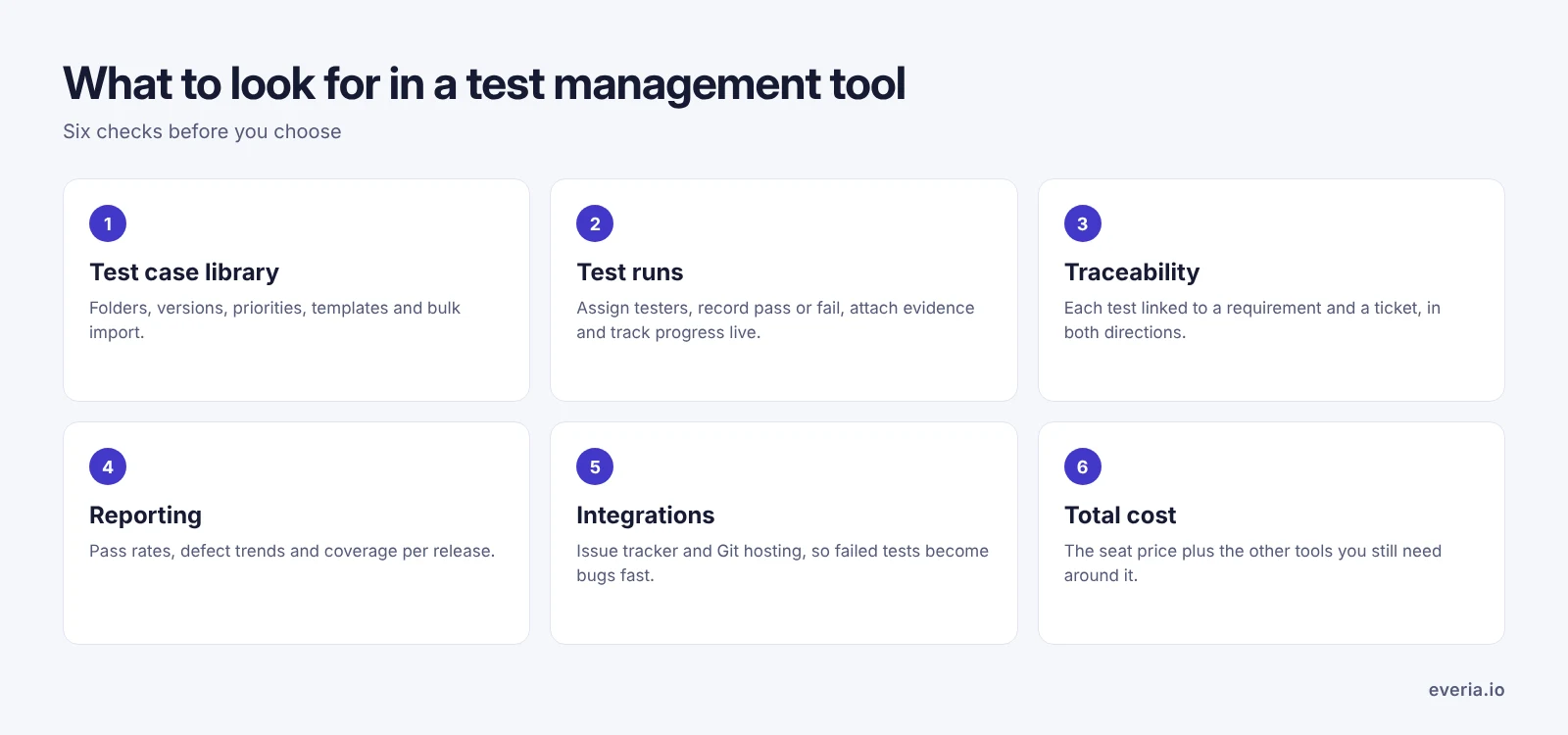
Most standalone test management tools are strong on the first two. The difference shows up in traceability and total cost, which depend on where your tickets and requirements live.
Test case management with AI
In most test management tools, you write every test case by hand. That’s slow, and coverage gaps are easy to miss. In Everia, you upload a spec or write a requirement in Nexus, Everia’s docs and knowledge base, and the AI drafts structured test cases from it. It can also generate test cases from acceptance criteria.
Your team then reviews and refines them in the test case library:
- Organise test cases in folders, with priority tags and reusable templates.
- Version test cases as requirements change.
- Import existing test cases in bulk, so you don’t start from zero.
See how it works in the test case management docs.
Test runs and release readiness
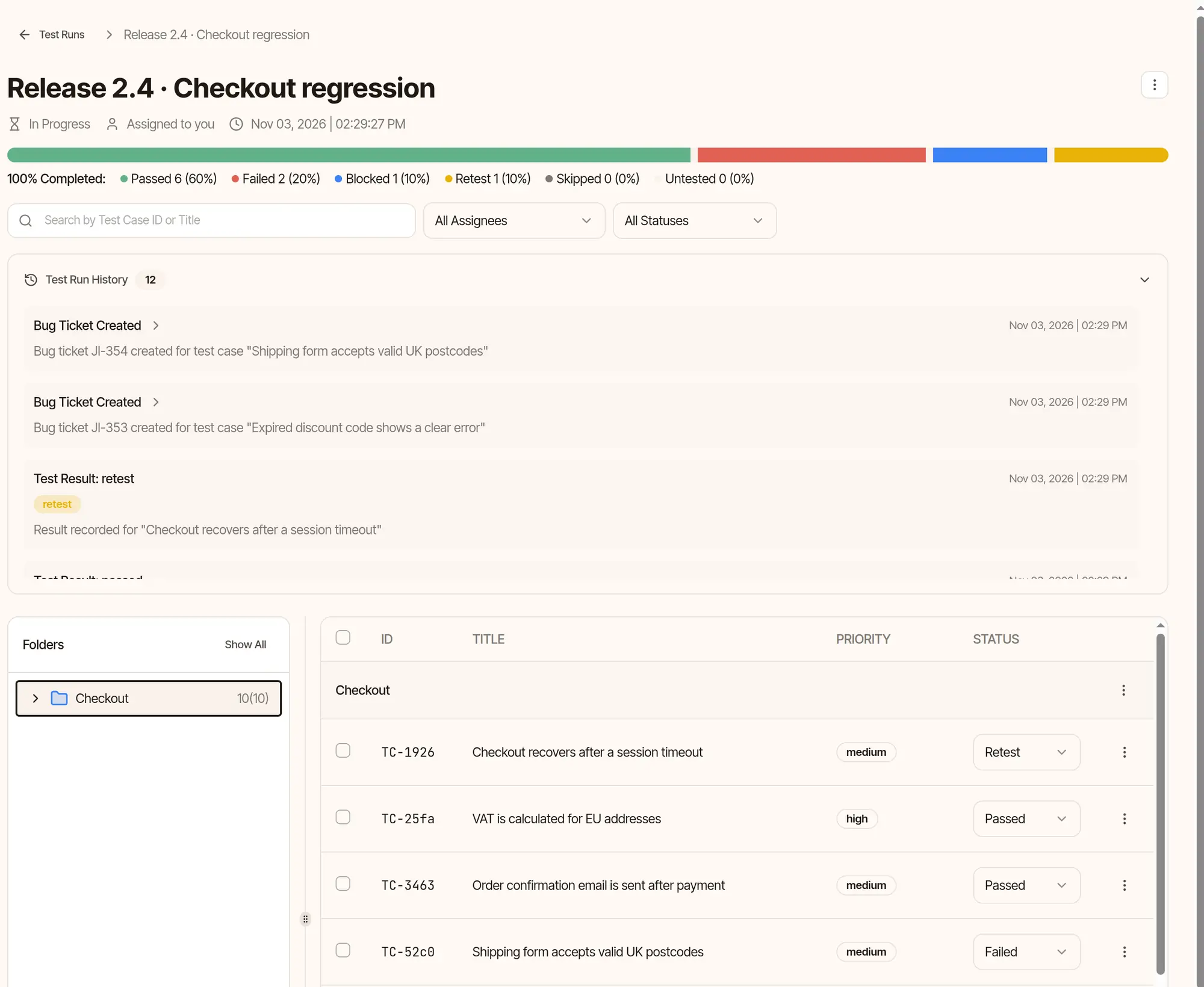
A test management tool earns its value on release day. In Everia, test runs track every cycle with live status, several assignees and attachments for screenshots or logs.
QA reports show pass rates, defect trends and test coverage across releases, and can be exported. Everia also combines open blockers, test pass rates, unresolved tickets and missing docs into a release readiness score, so “Can we ship?” has one clear answer.
Traceability from requirement to test
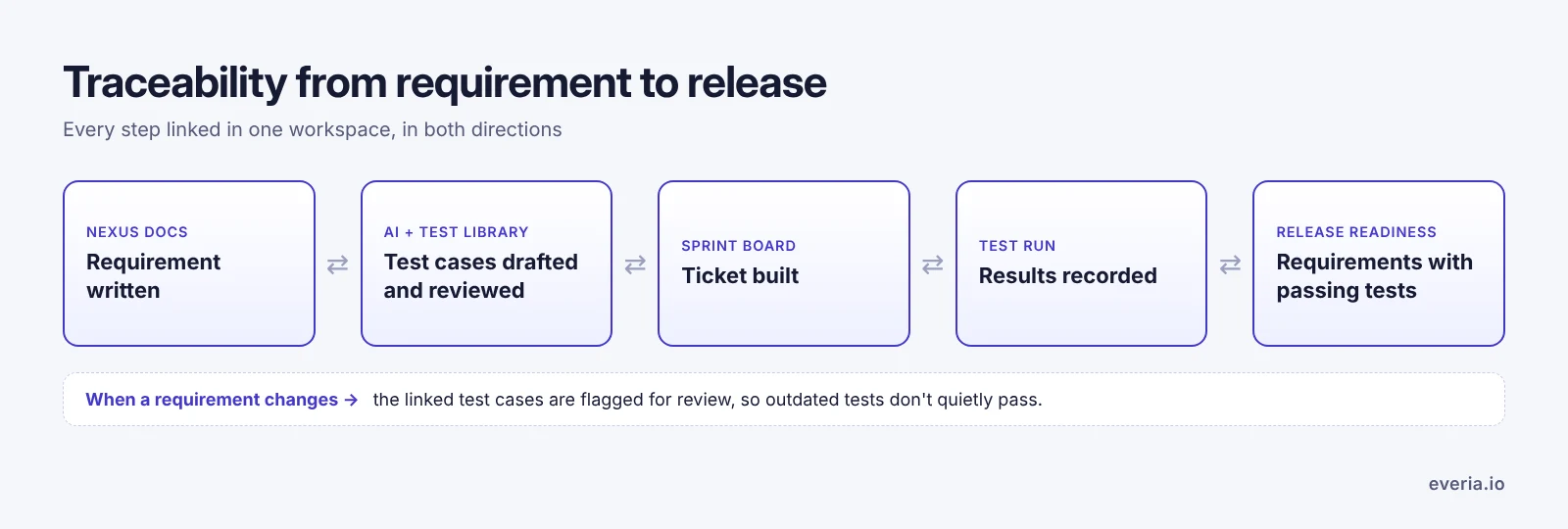
Because Everia’s test management tool shares a workspace with your tickets and docs, linking is native and works both ways: requirement to test case to release. When a requirement changes, Everia flags the linked test cases for review, so outdated tests don’t quietly pass. Read more about linking test cases to requirements in Everia.
A test management tool for Jira teams: add-on or built in?
Jira doesn’t include test management on its own. Jira teams usually add a Marketplace app such as Xray or Zephyr, or connect a standalone test management tool such as TestRail.
That works, but it means another subscription, another admin and requirements that often sit in a third product, Confluence. Everia takes a different route: tickets, tests and docs are in one place. If you still use Jira, Everia’s Jira integration syncs test results with Jira tickets in both directions and can create Jira issues from failed tests.
Our take: if your company is committed to Jira for the long term and only QA needs a new tool, a Jira app may be simplest. If you’re also unhappy with the Jira, Confluence and add-on stack, a tool with everything built in is worth a trial. See our list of Jira alternatives.
Everia vs TestRail, Qase, Testiny and Testmo
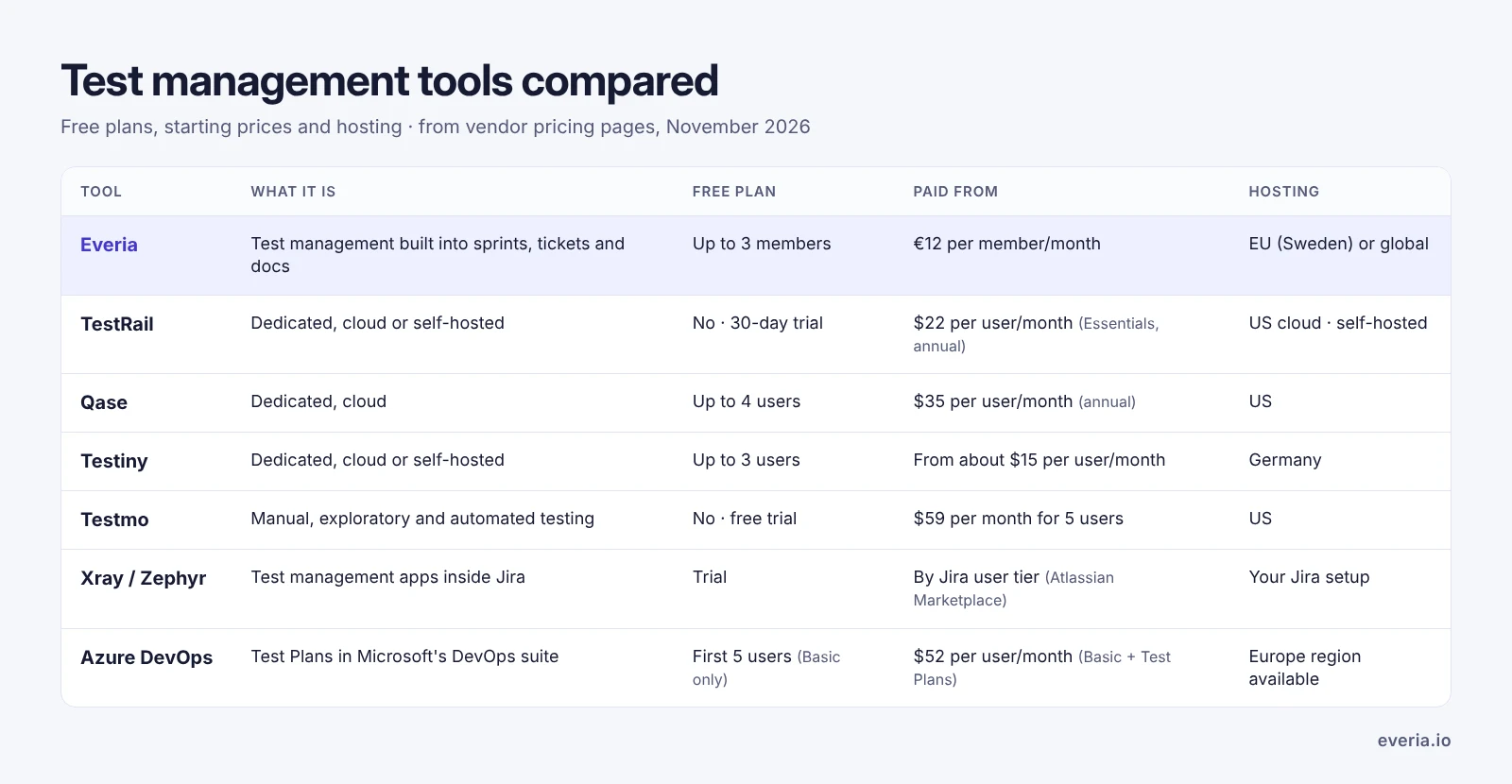
Dedicated test management tools are strong at what they do. Here’s how they compare with Everia, based on each vendor’s pricing page in November 2026:
| Tool | What it is | Free plan | Paid from | Hosting |
|---|---|---|---|---|
| Everia | Test management built into sprints, tickets and docs | Up to 3 members for 2 months | €12 per member/month, every feature | EU region (Sweden) or global |
| TestRail | Dedicated test management tool, cloud or self-hosted | No, 30-day trial | $22 per user/month billed annually (Essentials, up to 5 users); Professional $38 | US cloud; self-hosted option |
| Qase | Dedicated test management tool, cloud | Up to 4 users, 2 projects | $35 per user/month billed annually | US (AWS) |
| Testiny | Dedicated test management tool, cloud or self-hosted | Up to 3 users | From about $15 per user/month | Germany |
| Testmo | Manual, exploratory and automated testing in one, cloud | No, free trial | $59 per month for 5 users | US (AWS) |
| Xray / Zephyr | Test management apps inside Jira | Trial | Priced by your Jira user tier on the Atlassian Marketplace | Depends on your Jira setup |
| Azure DevOps | Test Plans inside Microsoft’s DevOps suite | First 5 users (Basic, no Test Plans) | $52 per user/month for Basic + Test Plans | Europe region available |
Our take:
- TestRail is mature and purpose-built, a safe choice for large QA teams with separate processes.
- Testmo stands out if automated test results are central to your QA work.
- Testiny is a good option if you want a dedicated tool hosted in Germany.
- Qase has a generous free plan for small QA teams.
- Everia is the better fit when you want the test management tool, the tickets and the requirements in one place, rather than another product to connect.
What a separate test tool really costs
Here’s what a standalone test management tool plus the rest of a typical stack costs for a 12-person team with 4 QA engineers, at list prices:
| Setup | Monthly cost | Products |
|---|---|---|
| Everia Team | €144 (12 × €12): tickets, sprints, test management, docs and time tracking | 1 |
| Jira Standard + Confluence + TestRail Professional | TestRail alone is $152 (4 × $38, billed annually), plus 12 Jira and 12 Confluence seats | 3 |
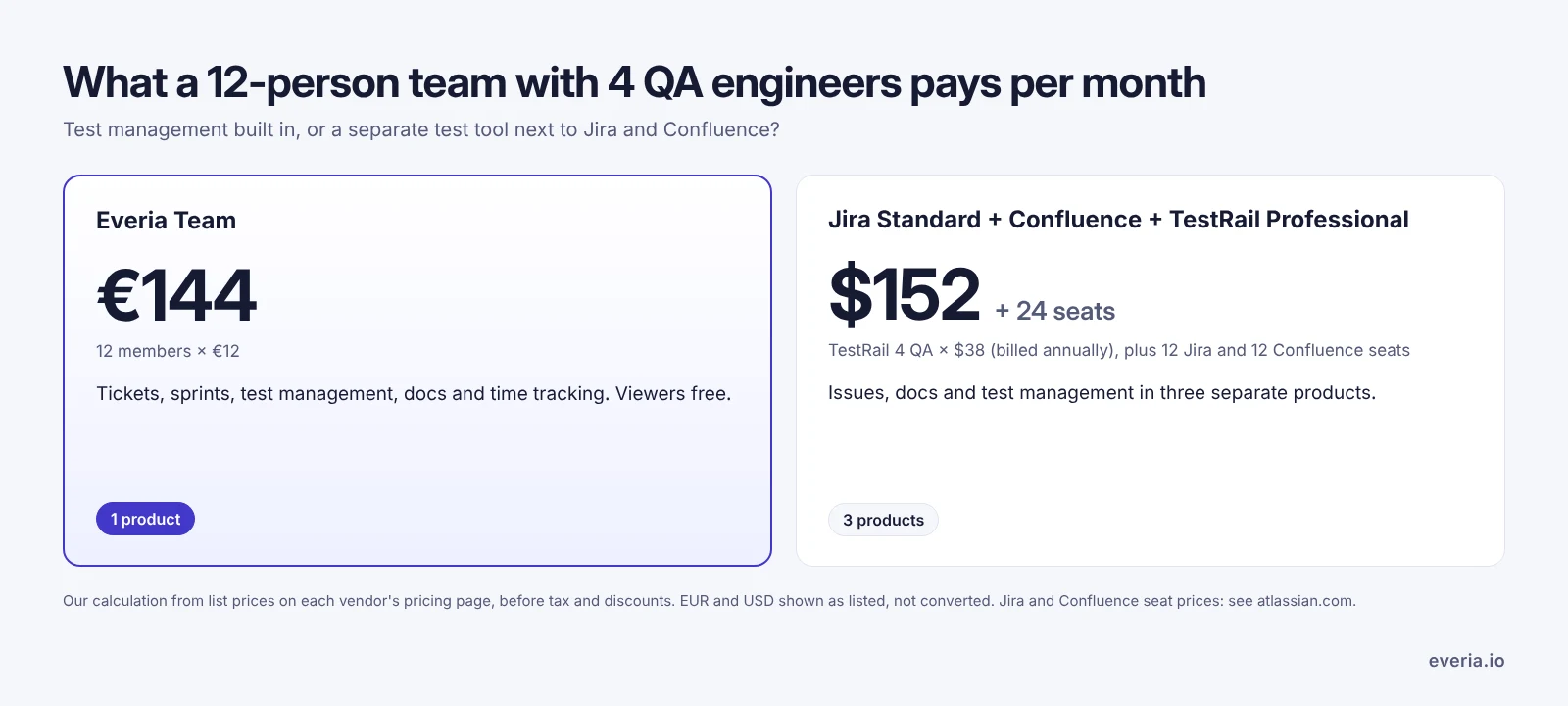
This is our own calculation, before tax and discounts, and the currencies differ. The bigger difference is the number of products to pay for, administer and keep in sync. Try the Everia stack savings calculator with your own numbers.
Free test case template
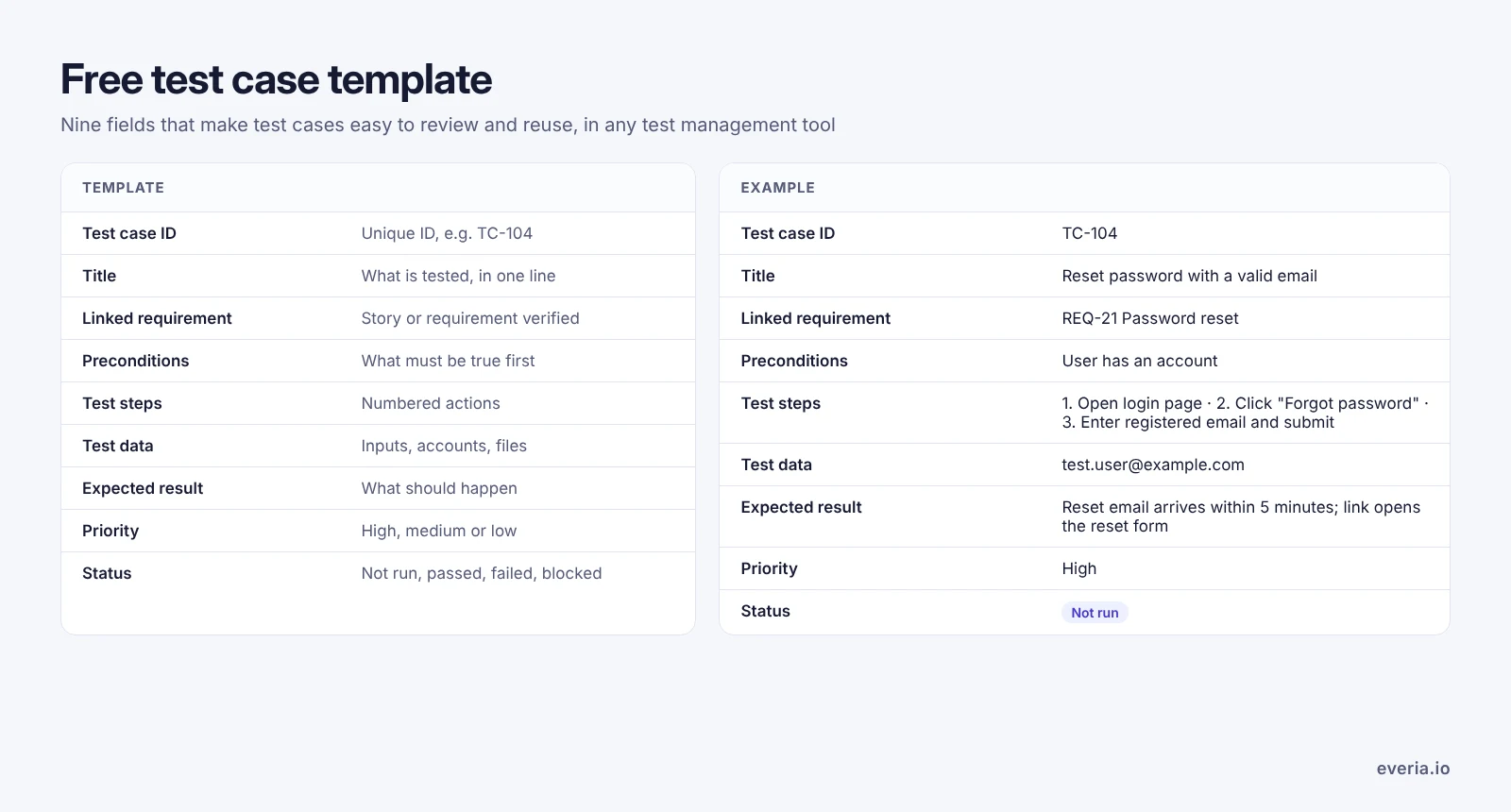
Whatever test management tool you use, a consistent format makes test cases easier to review and reuse. Copy this template:
| Field | What to write |
|---|---|
| Test case ID | A unique ID, for example TC-104 |
| Title | What is being tested, in one line |
| Linked requirement or ticket | The story or requirement this test verifies |
| Preconditions | What must be true before the test starts |
| Test steps | Numbered actions, one per line |
| Test data | Inputs such as usernames, amounts or files |
| Expected result | What should happen if the feature works |
| Priority | High, medium or low |
| Status | Not run, passed, failed or blocked |
Example: TC-104: Reset password with a valid email. Precondition: the user has an account. Steps: 1. Open the login page. 2. Click “Forgot password”. 3. Enter the registered email and submit. Expected result: a reset email arrives within 5 minutes and the link opens the reset form.
In Everia, test cases follow this structure and link to their requirement automatically, so you can use the template as a starting point and let the AI draft the rest.
Your test data stays in the EU
Choosing a test management tool also means choosing where your test data lives. Everia is a Swedish company. At signup you choose the EU region (Sweden) or the global region, at the same price, on every plan including free. A data processing agreement is published, and audit trail and export are included on every plan. Enterprise customers get single sign-on and can request a dedicated EU instance or on-premises hosting.
Pricing
Everia’s pricing is simple: the test management tool and every other feature are on every plan.
| Plan | Price | Includes |
|---|---|---|
| Free | €0 for 2 months | Up to 3 members, 1 project, 10 free viewers, and access to all features, including test management. Then €12 per member per month. |
| Team | €12 per member per month | Every feature, 25 free viewers, monthly or annual billing |
| Enterprise | Custom | Signed DPA, named support, SCIM, dedicated EU or on-premises hosting on request |
Viewers, such as product owners or clients who only read and comment, are free. See Everia pricing.
Who Everia is for, and who it isn’t
A good fit: dev and QA teams that want a test management tool in the same place as their sprints, tickets and requirements, especially teams replacing a Jira, Confluence and test add-on stack.
Not the best fit: large QA departments that run testing as a separate process and need the depth of a dedicated, long-established test management tool, or teams that must stay inside Jira. Everia was founded in 2025, so its integration list is shorter than older tools. Our Everia vs TestRail and Everia vs Qase pages explain where each one wins.
FAQ
What is a test management tool?
A test management tool helps QA and dev teams write, organise, run and track software tests. It stores test cases, records test run results and reports on coverage and quality, ideally linked to the requirements and tickets being tested.
Is Jira a test management tool?
Not on its own. Jira is an issue tracker. Teams usually add test management through a Marketplace app such as Xray or Zephyr, or connect a separate test management tool. Everia includes test management alongside tickets, so no add-on is needed.
Is there a free test management tool?
Yes. Everia’s test management tool is free for 2 months for teams of up to 3 members, with every feature included, then €12 per member per month. Other tools offer free plans or trials with different limits, so compare what each one includes.
Which test management tool is best?
The best test management tool depends on how your team works. TestRail suits large, separate QA teams, Testmo suits automation-heavy teams, and Xray or Zephyr suit teams that must stay inside Jira. Everia suits dev and QA teams that want testing, tickets and requirements in one workspace.
What’s the difference between test management and defect management?
Test management covers planning and running tests. Defect management covers tracking the bugs those tests find. In Everia both live in one place: a failed test links to a ticket, and with the Jira integration it can create a Jira issue.
Can AI write test cases?
Yes, in some test management tools. Everia’s AI drafts structured test cases from requirements, specs and acceptance criteria. Your team should still review them, because AI works from what’s written down and can miss unwritten business rules.
Can I use Everia’s test management tool with Jira?
Yes. Everia syncs test results with Jira tickets in both directions and can create Jira issues from failed tests, so you can adopt it for QA first and move more work across later.
Try a test management tool that sits next to your sprints
Write test cases with AI, run them, and see what’s ready to release, in the same workspace as your tickets and docs. Start your 2 months free with up to 3 members. A payment card is required.