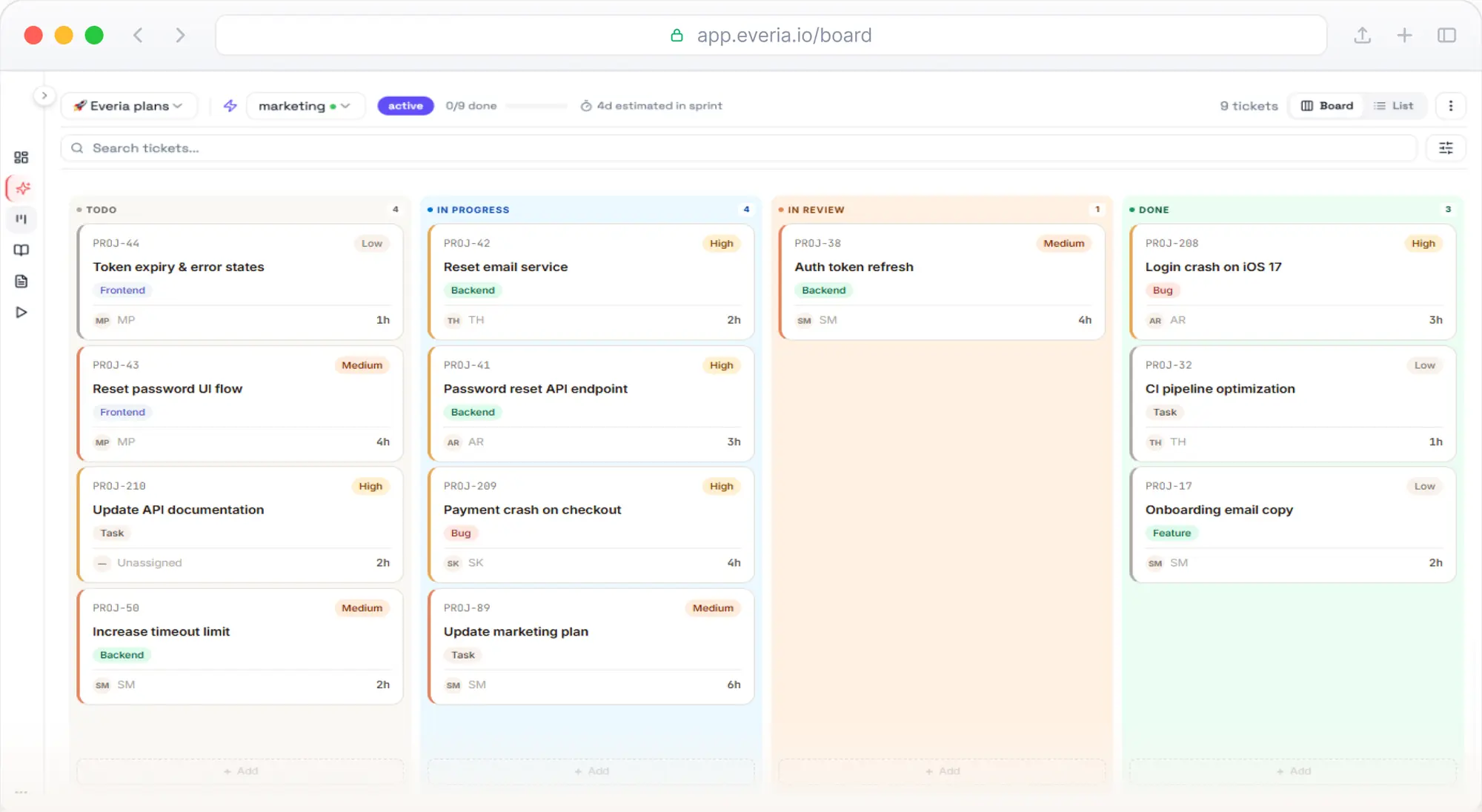
What is agile project management software?
Agile project management software helps teams plan and deliver work in short cycles, adjusting as they learn. It supports the ideas behind the Manifesto for Agile Software Development, whose first principle is “early and continuous delivery of valuable software”.
In practice, that means a backlog, sprints or a kanban flow, a board everyone can see, and a regular retrospective. The Scrum Guide describes sprints as “fixed length events of one month or less”, while the Kanban Guide focuses on visualising a workflow and managing work in progress. Good agile project management software supports both.
What good agile project management software does
When you compare tools, look past the feature list and check whether the software covers the whole delivery loop:
- Plan: a backlog, sprint planning and estimates the team trusts.
- Track: a board that shows real status, not a stale spreadsheet.
- Test: test cases linked to the work they verify.
- Document: requirements and decisions next to the tickets.
- Improve: retrospectives with actions that actually get done.
- Measure: velocity, capacity and time spent, without extra add-ons.
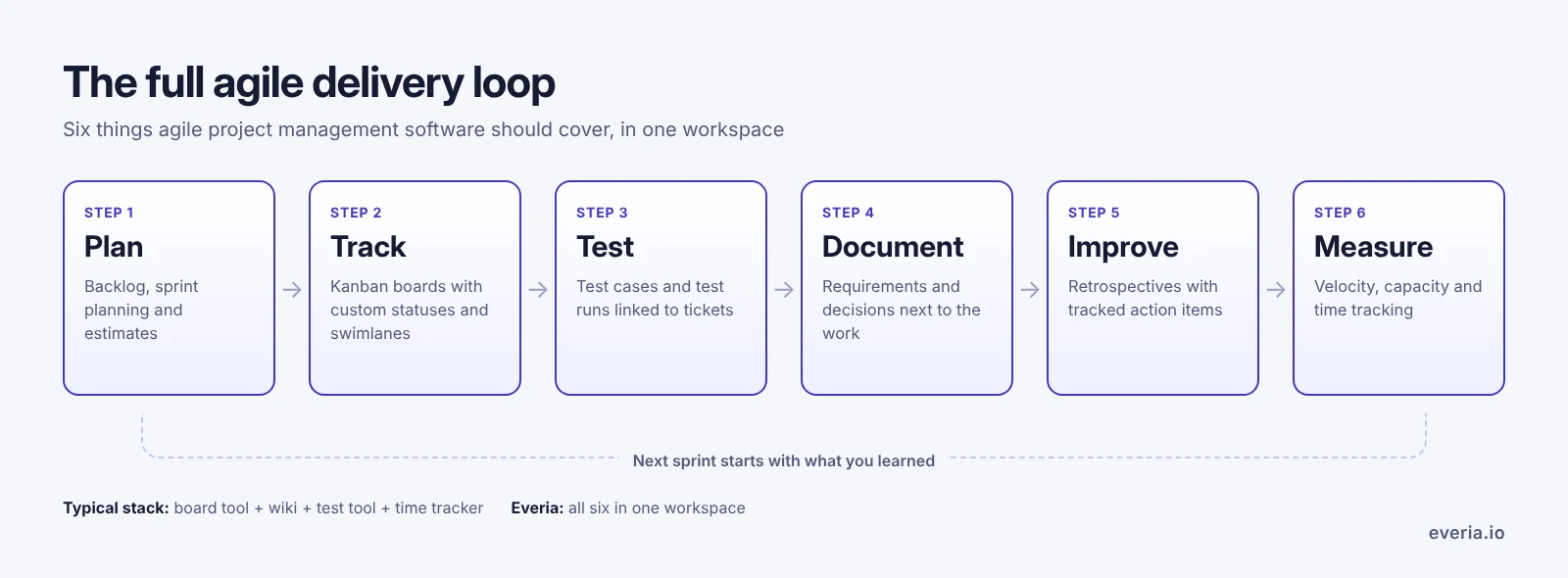
Most agile project management software covers the first two. Teams then add a wiki, a test tool and a time tracker. Everia covers all six in one place.
Sprint planning
Sprint planning is where agile project management software earns its place. In Everia, you plan sprints from a single backlog and see capacity before you commit. Everia’s sprint analytics track velocity, capacity and delivery predictability over time, so planning is based on data rather than gut feel.
Example: if your velocity history shows the team completes about 30 points a sprint, you can see that while planning and push back before a 50-point sprint is agreed.
Kanban boards
Drag-and-drop kanban boards with custom statuses, swimlanes and sprint-aware workflows. Each team edits statuses and flows for its own project, without waiting for an admin. Teams that work in continuous flow rather than sprints can run a pure kanban board in the same agile project management software.
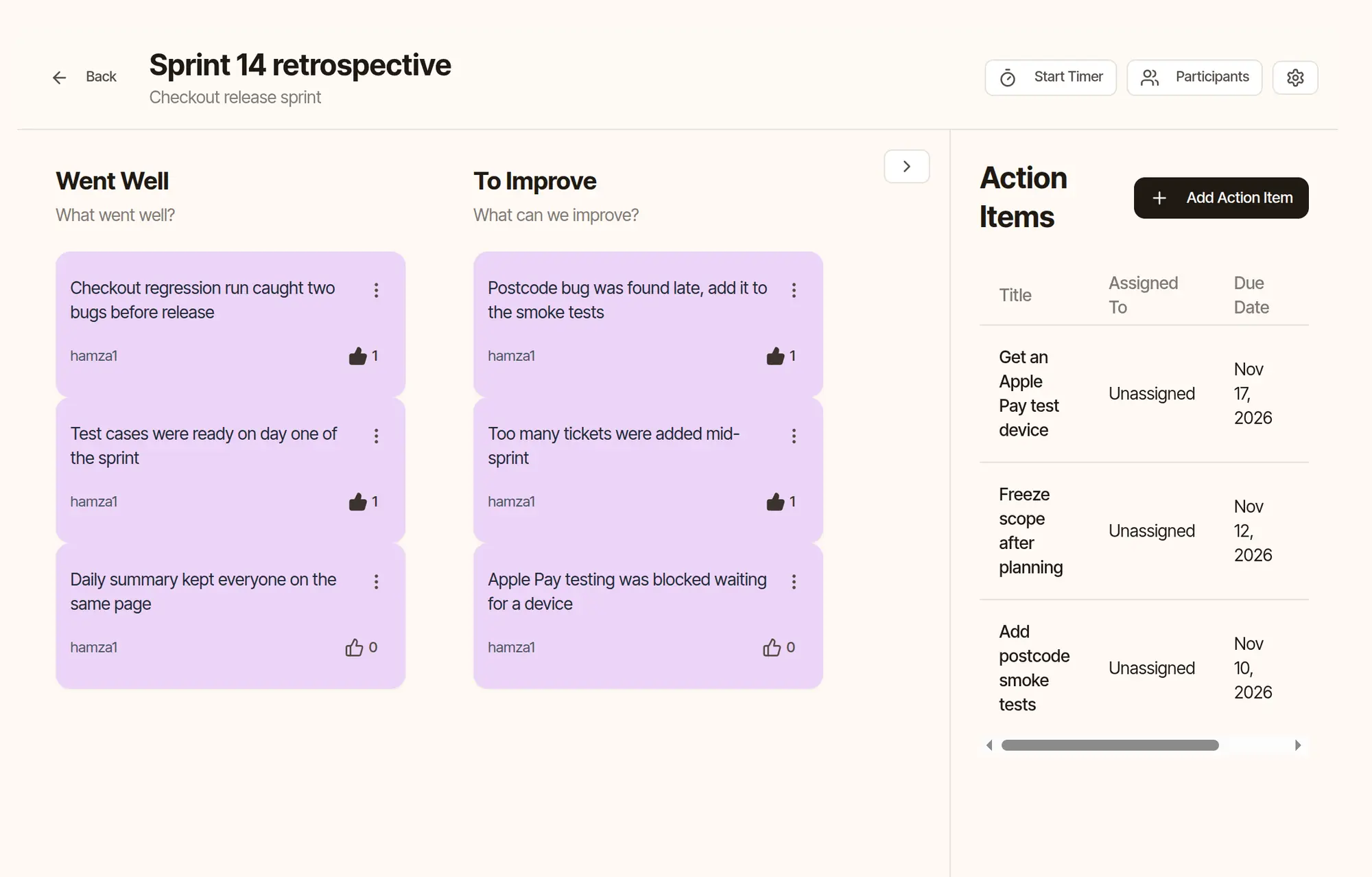
Retrospectives
Many teams run retros outside their agile project management software, in a whiteboard app, and the actions get lost. In Everia, you run structured retros with several board templates, anonymous voting and action-item tracking. Actions stay linked to the project, so the next sprint starts with last sprint’s improvements in view. For ideas, read our guide to agile retrospectives that actually improve your sprints.
Time tracking
Log time per ticket, see team workload and compare logged time with estimates. Detailed activity reports can be exported. Because time tracking is part of the agile project management software, there’s no separate tool to reconcile at month end. Learn more about time tracking in Everia.
From requirements to tickets with AI
Most agile project management software expects you to write every ticket by hand. In Everia, you write requirements in Nexus, Everia’s docs and knowledge base, and the AI assistant generates stories, tickets and test cases from them. It can also create test cases from acceptance criteria.
The assistant also helps day to day:
- Daily summary: a plain-English brief each morning on what’s in flight, blocked or at risk.
- Suggested actions: it suggests reassigning overloaded tickets, escalating blockers and surfacing risks.
- Ask your project: search docs and project data in natural language.
It works within each member’s permissions and asks for confirmation before deleting anything. AI credits belong to the workspace, not to each seat, and the free plan includes 500 credits a month.
Test management built in
This is where Everia differs most from typical agile project management software. Test case management and test run execution sit next to your tickets:
- Create and version test cases, with folders, bulk import and templates.
- Run test cycles with live status, several assignees and attachments.
- Link test cases to tickets and requirements for full traceability.
- Track pass rates, defect trends and coverage across releases.
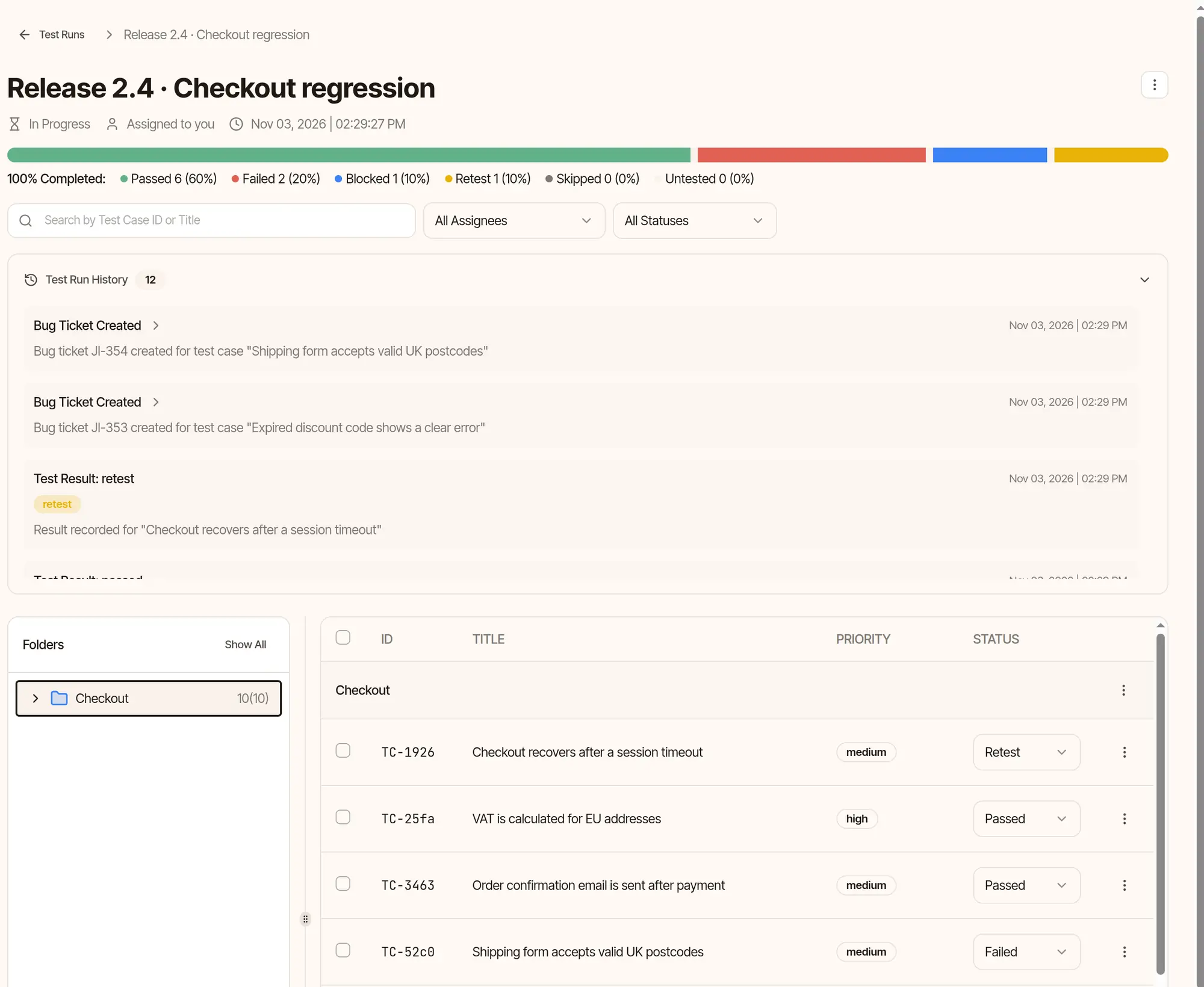
QA engineers work in the same tool as developers, so “Is this ready to release?” has one answer. Learn more about Everia’s test management tool, or see how it compares with a dedicated test tool in Everia vs TestRail.
Integrations
Agile project management software only works if it fits the tools you already use. Everia connects with:
- GitHub: commits, branches and pull requests link to tickets automatically.
- GitLab: create and track GitLab issues from tickets and test cases.
- Slack, Telegram and WhatsApp: create tickets, log time and get updates from chat.
- Jira: sync tickets with Jira, or import your Jira backlog when you switch.
Agile project management software tools compared
How does Everia compare with other agile project management software tools? Here are the main differences, based on each vendor’s pricing page in October 2026:
| Tool | Best for | Test management | Free plan | Paid from (per user/month) |
|---|---|---|---|---|
| Everia | Dev and QA teams who want one workspace | Built in | 2 months for up to 3 members | €12 |
| Jira | Large teams with complex workflows | Marketplace add-on (e.g. Xray, Zephyr) | Up to 10 users | See Jira pricing |
| Linear | Fast issue tracking for product teams | Not built in | Up to 250 issues | $10, billed yearly (pricing) |
| Azure DevOps | Microsoft-based teams | Test Plans, $52 per user with Basic | First 5 users | $6 (pricing) |
| ClickUp | Teams beyond engineering | Not built in | Yes | $7–$9, billed yearly (pricing) |
Our take: if your team only needs fast issue tracking, Linear is excellent. If you’re deep in Microsoft tools, Azure DevOps fits well. Very large organisations with heavily customised Jira workflows may be better off staying on Jira. Everia is the strongest fit for teams that want agile project management software with testing and docs included rather than added on. For detailed comparisons, see Everia vs Jira, Everia vs Linear and Everia vs ClickUp, or see our full comparison of Jira alternatives.
Your data stays in the EU
Choosing agile project management software also means choosing where your data lives. Everia is a Swedish company. At signup you choose the EU region (Sweden) or the global region, at the same price, on every plan including free. A data processing agreement is published, and single sign-on, audit trail and export are never locked behind a higher plan. Enterprise customers can request a dedicated EU instance or on-premises hosting.
Pricing
Simple pricing for agile project management software, with every feature on every plan:
| Plan | Price | What you get |
|---|---|---|
| Free | €0 for 2 months | Up to 3 members, 1 project, 10 free viewers, every feature, 500 AI credits a month. Then €12 per member per month. |
| Team | €12 per member per month | Every feature, 25 free viewers, monthly or annual billing (2 months free annually) |
| Enterprise | Custom | Signed DPA, named support, SCIM, dedicated EU or on-premises hosting on request |
Viewers, such as clients or managers who only read and comment, are always free. There are no seat minimums or annual lock-in. See full details on Everia pricing, or compare your current stack with the savings calculator.
Who Everia is for, and who it isn’t
A good fit: software teams that run sprints or kanban, test every release and want planning, testing, docs and time tracking in one agile project management software tool, from startups to growing product teams.
Not the best fit: organisations that rely on specific Jira Marketplace apps, need cross-project portfolio roadmaps (Everia’s views are per project) or run a service desk. Everia was founded in 2025, so its integration list is shorter than long-established tools.
FAQ
What is agile project management software?
Agile project management software helps teams plan, track and deliver work in short iterations. It typically includes a backlog, sprints or kanban boards, and retrospectives. Everia adds test management, docs and time tracking in the same tool.
What are the best agile project management tools?
The best agile project management software depends on your team. Everia suits dev and QA teams that want everything in one place, Linear suits teams focused on fast issue tracking, Azure DevOps suits Microsoft-based teams and Jira suits large organisations with complex workflows.
Is there free agile project management software?
Yes. Everia is free for 2 months for up to 3 members with every feature included, then €12 per member per month. Jira, Linear, Azure DevOps and ClickUp also have free plans with different limits.
How much does agile project management software cost?
Paid plans for the agile project management software tools compared above start between $6 and $10 per user per month, or €12 per member for Everia. Most also offer a free plan for small teams, so check what each free plan limits.
Is agile project management only for software teams?
No. Agile started in software, but marketing, design and operations teams use it too. Everia is built mainly for software and QA teams, so it includes development features such as test management and Git integrations.
Which agile project management software is best for QA teams?
Look for agile project management software with test management built in, so test cases and results sit next to the tickets they verify. Everia includes test cases, test runs and traceability on every plan; Azure DevOps offers Test Plans as a paid add-on.
Can I switch from Jira to Everia?
Yes. You can import your Jira backlog, and two-way Jira sync lets you run both tools side by side while your team switches. Contact us if you’d like help planning the move.
Does Everia support both Scrum and kanban?
Yes. You can run time-boxed sprints with sprint analytics, or a continuous kanban flow, in the same agile project management software.
Start planning your next sprint in Everia
Bring sprints, boards, retros, test cases, docs and time tracking together in agile project management software built for dev and QA teams. Start your 2 months free with up to 3 members. A payment card is required.