Our Jira alternative is built for European teams, without the complexity or compliance issues.

Key Takeaways
The real cost of Jira is never just Jira. When you add Confluence, Zephyr, and Tempo, a 10-person European team is spending €400–700/month on tools that still don't talk to each other properly. Everia replaces all four at €12/member/month while keeping viewers 100% free.
GDPR compliance shouldn't require a checklist across four vendors. One platform means one data agreement, one audit trail, and one less conversation with your legal team every time an enterprise client asks where their data lives.
The Tool That Runs Your Team Is Also Quietly Draining It
If you're running an engineering team in Europe, there's a good chance your stack looks something like this: Jira for project management, Confluence for documentation, TestRail or Zephyr for QA, and Tempo for time tracking.
Four tools. Four subscriptions. Four logins. Four places where context gets lost. And the bill? For a 10-person team, you're looking at anywhere between €400 and €700 per month, easily €5,000–8,000 a year, just to coordinate work that should flow naturally.
This is the quiet tax that European teams have been paying for years, assuming there was no alternative serious enough to switch to. There is now. It's called Everia.
What Is Everia?
Everia (everia.io) is an AI-native project management platform that replaces Jira, TestRail, Confluence, and your time tracker in a single workspace, at a transparent €12/member pricing model with free read-only viewers, and an AI layer that writes status updates before you even ask.
It was built by a company incorporated in Sweden, which matters more than it sounds. This is built inside the same product ecosystem European teams use daily, felt the same friction, and chose to build something better, rather than just adding features to an already bloated tool.
The Real Problem With Jira (That Nobody Talks About Directly)
Jira is not a bad product. It became the default choice because it remained genuinely useful when teams were smaller and workflows were simpler. But over time, it became something else: an enterprise platform that smaller and mid-sized teams are expected to configure themselves into using productively.
Here is what that looks like in practice for most European teams today:
It is never just Jira. You need Confluence for documentation, Zephyr Scale or TestRail for QA, and Tempo for time tracking. Additionally, you will need a plugin for retros. Jira is the hub of a wheel, and every spoke costs extra.
GDPR compliance is murkier than it should be. Atlassian has made efforts here, but European teams, especially those handling sensitive client or user data, continue to face questions about data residency, processing agreements, and where exactly their sprint data is stored and processed. For enterprise teams and regulated industries, this is not a minor concern.
The interface has not aged gracefully. Jira was designed for a different era of software development. The result is an interface that requires training, configuration, and ongoing admin overhead that modern teams simply do not want to spend time on.
All of these reasons make a compelling case for asking: Is there a better way?
Everia vs Jira: A Direct Comparison
Feature | Jira | Everia |
Pricing model | Per user / per month (all seats) | €12/member (Viewers 100% FREE) |
Built-in test case management | ❌ Requires Zephyr or TestRail | ✅ Native |
Documentation | ❌ Requires Confluence | ✅ Nexus built-in |
Time tracking | ❌ Requires Tempo plugin | ✅ Native |
Retrospectives | ❌ Requires third-party | ✅ Built-in with clustering |
AI-generated sprint updates | ❌ | ✅ Auto-drafted before standup |
Requirements traceability | ❌ Manual | ✅ Automatic, linked to test cases |
GDPR compliant | Partial | ✅ Built in EU (Sweden) |
Setup time | Days to weeks | Hours |
Pricing growth | Scales with total headcount | Scales only with active builders |
What Everia Does That Jira Simply Cannot.
This is not a feature comparison; it is a fundamentally different philosophy of how project delivery should work.
Everything shares context
In Jira, your sprint board does not know what your QA team is doing in TestRail. Your Confluence documentation does not know which tickets have changed. In Everia, everything lives in one place and talks to everything else.
A requirement written in Everia's Nexus documentation layer instantly converts into tickets and test cases with a single click. A test that fails in a sprint surfaces in your sprint board. A retro action item becomes a ticket that rolls forward until it ships. The context is never lost because it was never separated to begin with.
AI that actually does the work
Everia's AI does not just answer questions. It writes your sprint status update from live data before your standup. It flags capacity overloads 48 hours before a sprint starts. It drafts your release notes and stakeholder updates in one click.
It surfaces which features are at risk of slipping before they do. This is not AI as a chat interface bolted onto a project tool but an AI embedded into the delivery loop itself.
Test cases that know why they exist
Every test case in Everia is derived from a requirement. Coverage gaps are flagged the moment you open a PR. You always know what you are testing and why, and when something breaks, you know exactly which requirement it traces back to.
Pricing that does not punish you for growing
Everia's Team plan is €12/member/month for active builders, while viewers and stakeholders get 100% free access. For European teams, compare what a 10-person team pays for Jira + Confluence + Zephyr + Tempo (typically €400–700/month) versus Everia where stakeholders and view-only roles cost nothing. European teams switching to Everia are saving thousands annually while eliminating the seat-tax tax, without losing a single capability.
GDPR and Data Privacy: The Angle European Teams Cannot Ignore
This deserves its own section because it is increasingly a deciding factor for European teams, particularly those in fintech, healthtech, legaltech, or any domain that handles user data.
Atlassian has made progress on data residency, but the nuances of where your data is processed, who has access to it, and what your audit trail looks like are questions that require effort to answer when you are using a suite of interconnected tools across multiple vendors.
Everia is Swedish-incorporated and built GDPR compliant by design. One platform, one data agreement, one audit trail, and zero US CLOUD Act exposure. For teams that regularly face questions from legal, compliance, or enterprise clients about how their project data is handled, this simplicity is not a minor convenience; it is a genuine operational advantage.
Everia is featured on European Purpose, an independent directory that evaluates and ranks top-tier European software solutions. Discover how Everia’s Swedish-built, GDPR-compliant AI workspace stands out against legacy US alternatives by eliminating seat taxes and fragmented tool sprawl.
European Purpose is an independent digital index and benchmarking platform dedicated exclusively to discovering, evaluating, and spotlighting software built within Europe. It serves as a launchpad for European software startups and scale-ups, connecting global engineering teams, tech leaders, and buyers with privacy-conscious, zero-bloat tech solutions.
Read the review https://europeanpurpose.com/tool/everia and see why global engineering teams are making the switch to a truly connected workspace.
Being featured there reflects something more than a product listing; it is an acknowledgement that Everia was built with European operational realities in mind, not retrofitted to meet them afterwards.
Who Is Everia Actually Built For?
Everia is not trying to be everything to everyone. It is built for specific types of teams, and if you fall into one of these categories, it is worth paying close attention.
Startups and scale-ups (10–100 people) who have outgrown basic tools but are not ready for enterprise complexity. You want something that works out of the box, grows with you, and does not require a dedicated admin to maintain.
Engineering teams with active QA processes who are tired of maintaining two completely separate tools for tickets and test cases. If your developers and QA engineers are constantly context-switching between platforms, Everia eliminates that.
Agencies managing multiple client projects who need clean time reporting, project visibility, and client-facing updates without pulling data from four different places at the end of every month.
Remote-first European teams where async clarity is everything. When your team is spread across Berlin, Amsterdam, Lisbon, and Warsaw, you cannot afford to have project context scattered across disconnected tools.
Product managers and project leads spend too much of their week writing status updates, chasing progress, and stitching together reports that should write themselves.
Your Project Data Stays in Europe—If You Need It To
For European engineering teams, the question of where data lives is not a minor detail. It comes up in procurement conversations, in enterprise client contracts, in internal legal reviews, and increasingly in competitive RFPs where data residency is a checkbox that can disqualify a vendor before the feature comparison even begins.
Everia is EU-hosted. For teams that need it, your project data, your tickets, requirements, test cases, sprint history, time logs, and documentation can remain within European borders, subject to EU data protection law, without routing through servers in the US or other jurisdictions.
This is not the default for most project management tools. Atlassian's data residency options exist but require specific configuration and come with limitations on which data is covered. Most US-headquartered SaaS tools treat EU data residency as an enterprise add-on, if they offer it at all.
For Everia, EU hosting is available on request. Teams that need to demonstrate compliance with GDPR's data residency requirements, particularly those in fintech, healthtech, legaltech, or any regulated industry handling personal data, can operate with the confidence that their project data does not leave the EU.
What this means in practice:
Data residency scenario | Most Jira / ClickUp setups | Everia (EU hosting) |
Data stored in EU servers | Optional/limited | ✅ Available on request |
Single data processing agreement | ❌ Multiple vendors | ✅ One platform, one DPA |
GDPR audit trail | Manual, cross-tool | ✅ Built-in |
Sub-processor list | Multiple, per tool | ✅ Single vendor |
Enterprise client data compliance | Complex to demonstrate | ✅ Straightforward |
This matters more as teams scale. A 10-person startup can absorb the compliance overhead of managing five vendor DPAs. A 50-person team handling enterprise client data in regulated industries cannot, and the cost of getting it wrong, in legal liability and lost contracts, is far higher than any SaaS subscription.
EU hosting on Everia is not automatic; teams need to request it. But the option exists; it is built into the platform architecture, and for the teams that need it, it is the clearest answer to the question every European enterprise procurement team eventually asks.
A Closer Look: What Everia Actually Looks Like in Practice
The features above are not concepts. Here is what they look like when your team is actually using them.
The Command Center — Your Project's Single Source of Truth
Most engineering teams start their day the same way. Someone opens four tabs. Someone asks in Slack, "What's the status of X?" A PM spends the first 45 minutes compiling a picture of what the team should already be able to see at a glance.
Everia's Command Center dashboard eliminates that. Every morning, before your standup, the dashboard automatically surfaces live signals across your entire project, without anyone compiling anything. It is not a report. It is not a summary someone wrote. It is a real-time read of what is happening across your sprints, QA, documentation, and team capacity, all in one view.
Here is what that looks like on a real team running a live project in Everia:
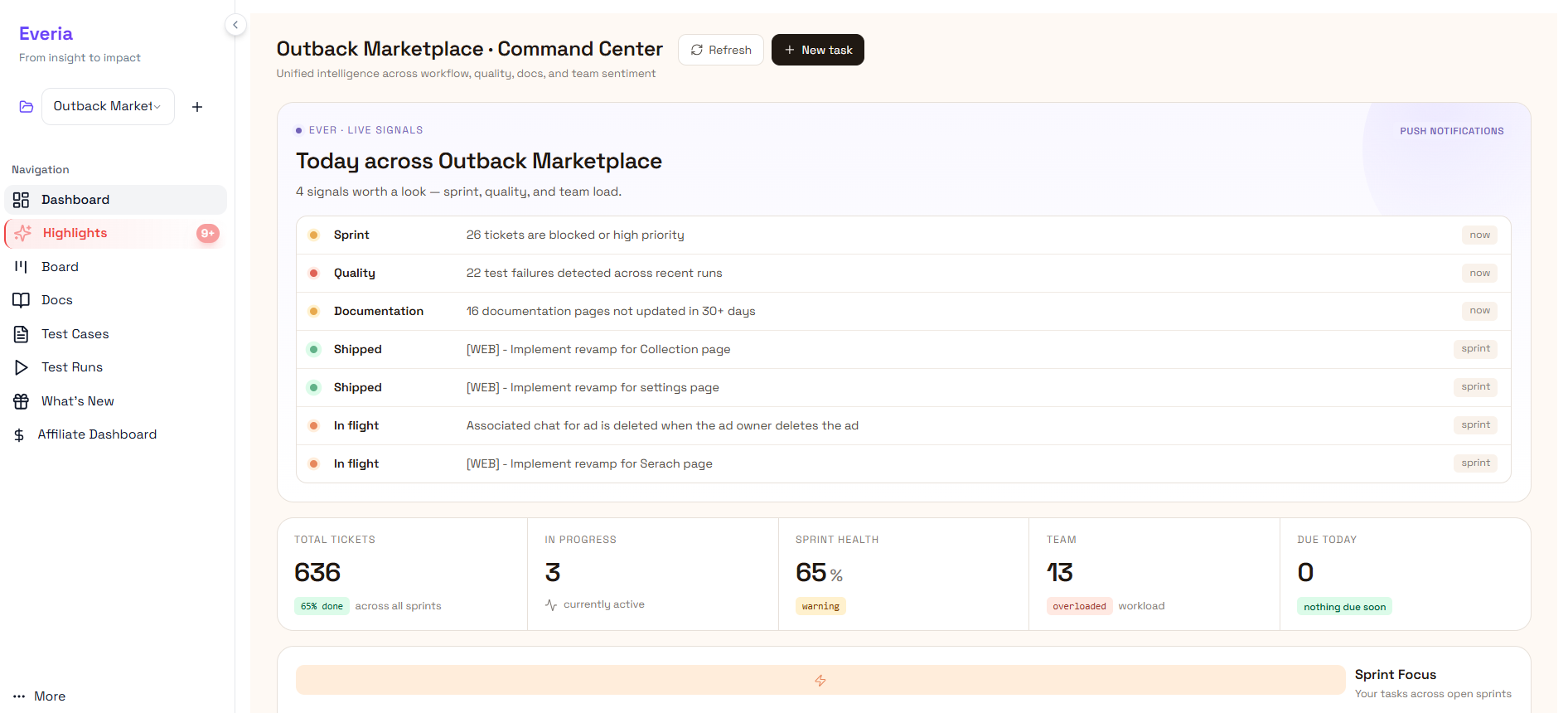
Sprint signals: 26 tickets flagged as blocked or high priority — surfaced automatically, not discovered in standup when someone mentions they have been stuck for two days.
Quality signals: 22 test failures detected across recent test runs — visible before QA raises a formal ticket, before a developer has to be interrupted, before the failure makes it to the sprint review.
Documentation signals: 16 documentation pages not updated in 30+ days — caught before a new team member tries to onboard from a stale doc, or before a stakeholder asks a question the docs cannot answer.
Delivery signals: Shipped items confirmed. In-flight tickets visible with their current status. Team workload flagged as overloaded before the sprint ends with half the commitments unmet.
Sprint health: 65% — with a warning flag. Team size: 13. Workload status: overloaded. All visible before the day starts, without a single manual input.
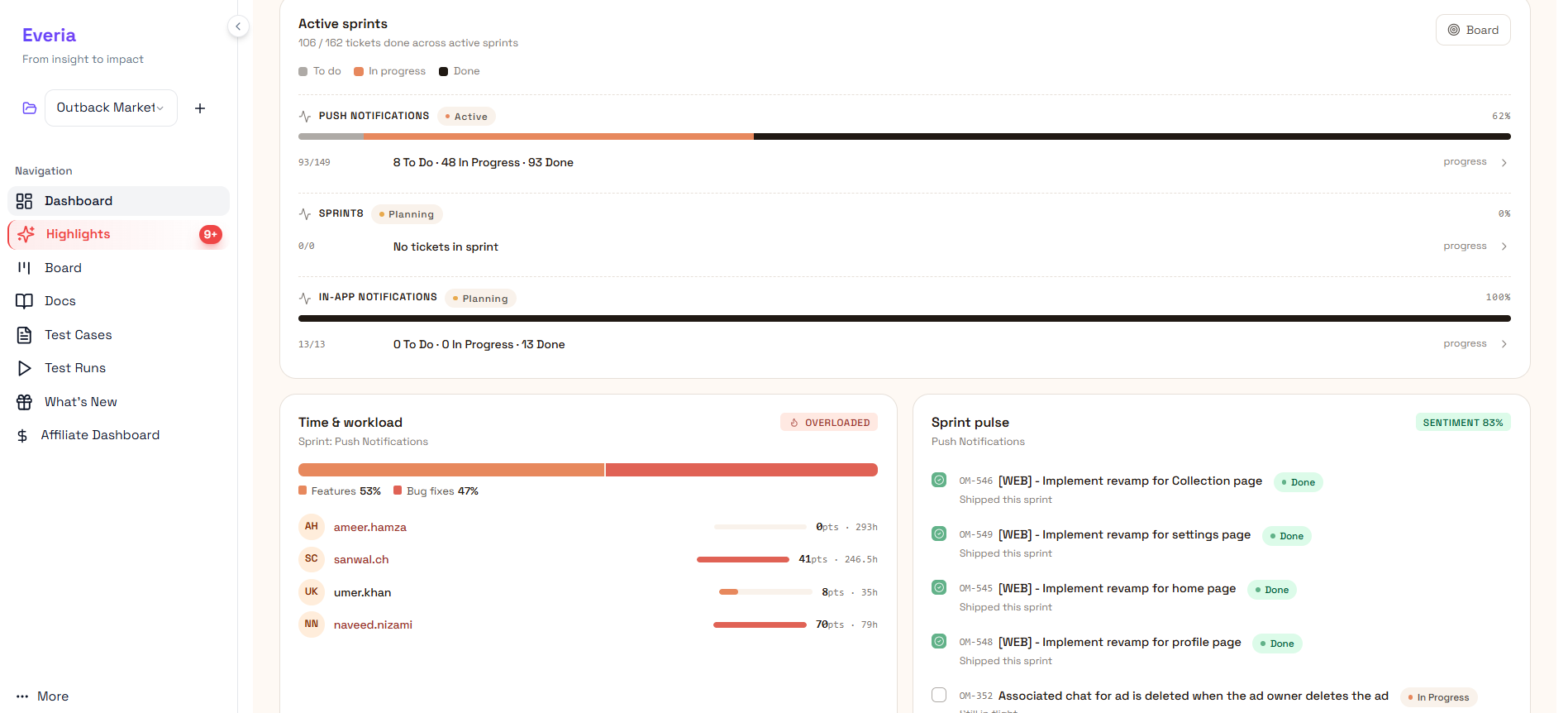
The bottom of the dashboard breaks this down further into a Sprint Focus view, your tasks across open sprints, and a Time & Workload panel showing exactly how capacity is distributed across the team. Who is at 293 hours. Who is at 35. Where the imbalance is. What it means for delivery.
In Jira, assembling this picture requires Confluence for documentation status, Tempo for workload data, a custom dashboard or third-party reporting tool for sprint health, and someone whose job is to pull it all together before the meeting.
In Everia, it is the default view when you open the product. No configuration. No manual pull. No middleware. This is what it means for project context to be infrastructure rather than overhead.
The Sprint Board — Built for How Teams Actually Work
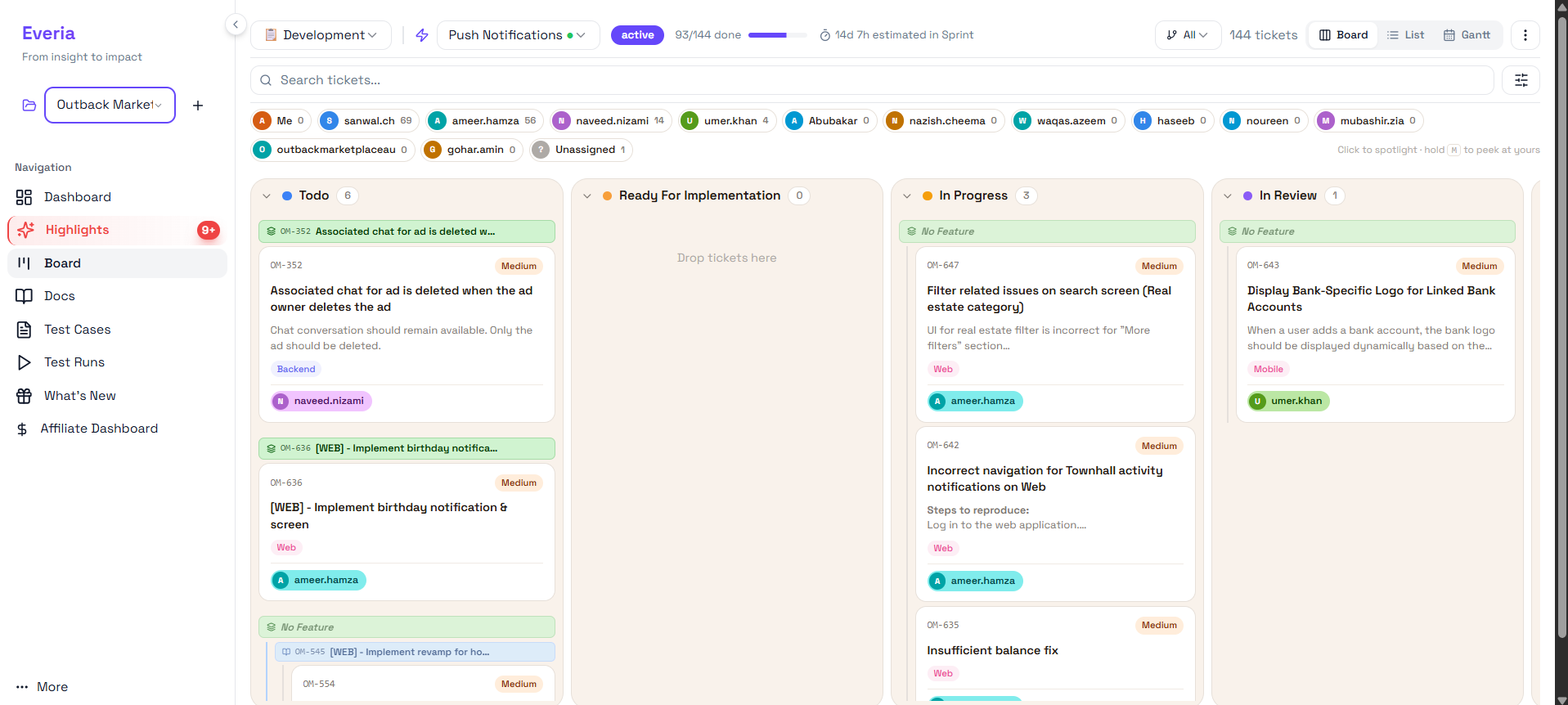
The Kanban board is the most familiar interface in project management. Most tools have one. What separates Everia's board is not the layout; it is what each ticket carries with it.
In Jira, a ticket on the board shows a title, a status, and an assignee. To see the full context- the description, the feature it belongs to, the platform it affects, the comments, the linked test cases- you click through to a separate view, then navigate back, then lose your place on the board.
In Everia, every ticket on the board clearly displays its context. The feature grouping is shown above each ticket cluster, so you can see at a glance which tickets belong to which feature, rather than inferring it from ticket labels. The platform tag (Web, Mobile, Backend) is visible on the card. The assignee is shown. The full description is visible on hover or with a single click, without leaving the board.
The board header shows live sprint progress in a real active sprint: 93 of 144 tickets done, with 14 days and 7 hours estimated remaining. That number updates in real time as tickets move. No manual refresh. No "what percentage are we at?" calculation in standup. The answer is at the top of the board at all times.
The columns themselves reflect real engineering workflow: To Do, Ready for Implementation, In Progress, In Review. The distinction between Todo and Ready for Implementation is meaningful; it reflects the reality that a ticket can be on the backlog without being properly scoped and ready for a developer to pick up. That distinction reduces the "I picked up a ticket, but it wasn't ready" problem that wastes engineering time every sprint.
Across the top of the board, every team member with assigned tickets is shown with their ticket count, so a lead can immediately see who is carrying the most, who has nothing assigned, and whether the sprint is evenly distributed or quietly concentrated on two people while three others are under-utilised.
The board also supports Board, List, and Gantt views, switchable in one click, so teams that prefer a timeline view for planning sprints against deadlines have that option without leaving the workspace or opening a separate tool.
Test Cases — 272 of Them, Organised, Searchable, and Linked to Everything
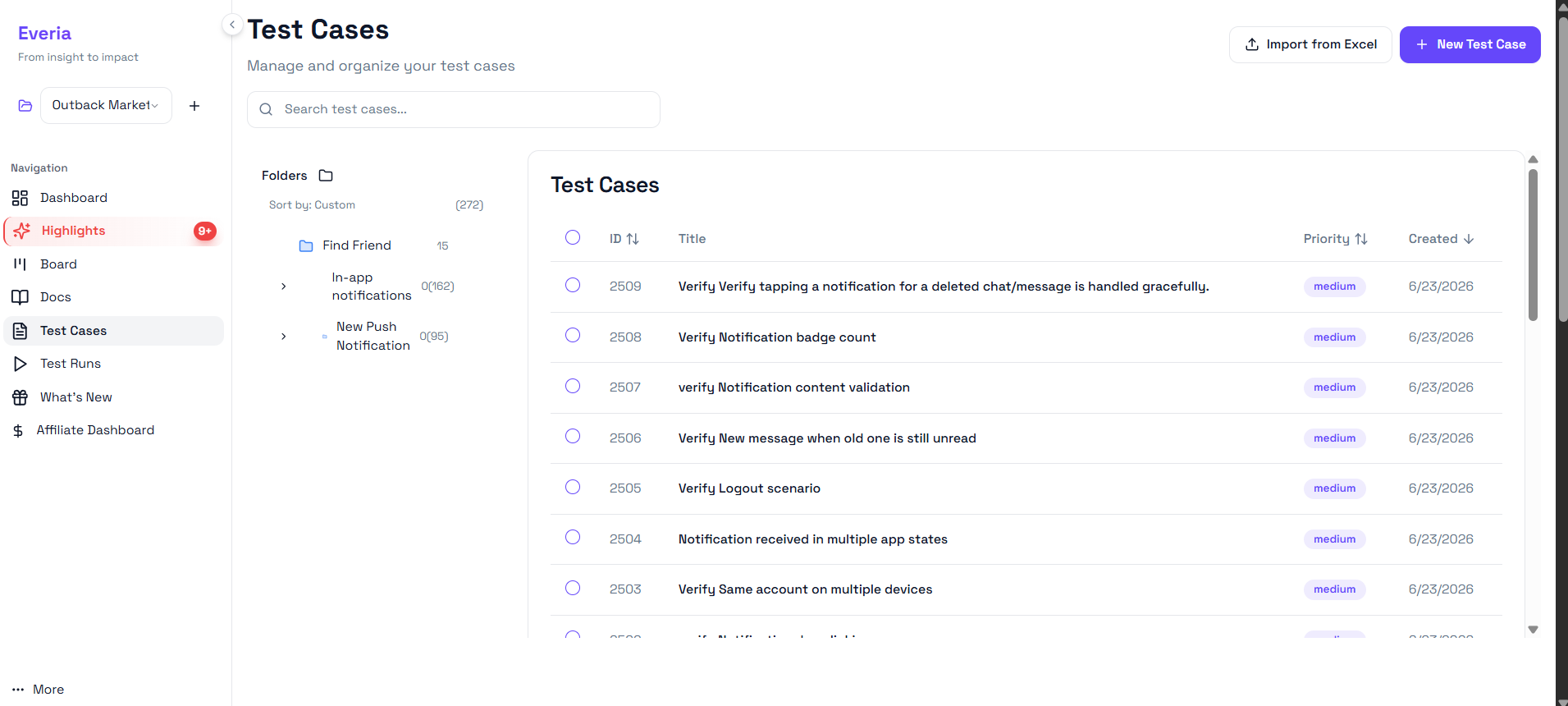
The single most consistent surprise for teams switching from Jira to Everia is native test case management. Not because it is unexpected- most teams know Everia includes it, but because of how well it integrates with the rest of the workflow.
In Jira, test cases do not exist. You buy Zephyr Scale or TestRail, set up a separate integration, maintain a separate login, and accept that your developers and QA engineers will be working in fundamentally different tools with no automatic connection between them.
When a requirement changes, propagating that change to the relevant test cases is a manual exercise. When a test fails, tracing it back to the requirement it was supposed to verify requires cross-referencing two separate systems.
In Everia, test cases are built into the same workspace as your tickets, requirements, and sprint board. They are organised into folders by feature. In a real project with 272 test cases, the folder structure shows Find Friend with 15 cases, In-app notifications with 162 cases, and New Push Notification with 95 cases, each linked directly to the tickets and requirements they cover.
Creating a new test case takes one click from the top right. Importing an existing library from Excel takes one file upload, useful for teams migrating from a legacy QA tool without wanting to recreate hundreds of cases manually. Each case shows its ID, title, priority, and creation date, sortable by any column, searchable by title.
The priority system (medium, high, critical) lets QA leads triage which cases to run first when sprint time is tight. The folder structure means a new QA engineer joining the team can understand the coverage landscape in minutes rather than hours, because the organisation reflects the actual feature structure of the product, not an arbitrary naming convention someone created three engineers ago.
Most importantly, every test case in Everia knows which requirement it was written to verify. When a requirement changes mid-sprint, and in most teams, requirements change mid-sprint more often than anyone admits, the affected test cases are automatically flagged. QA finds out immediately, not on day 8 when they are running tests against a spec that no longer exists.
Test Runs — Monitor and Manage Every Execution Cycle Without Leaving the Platform
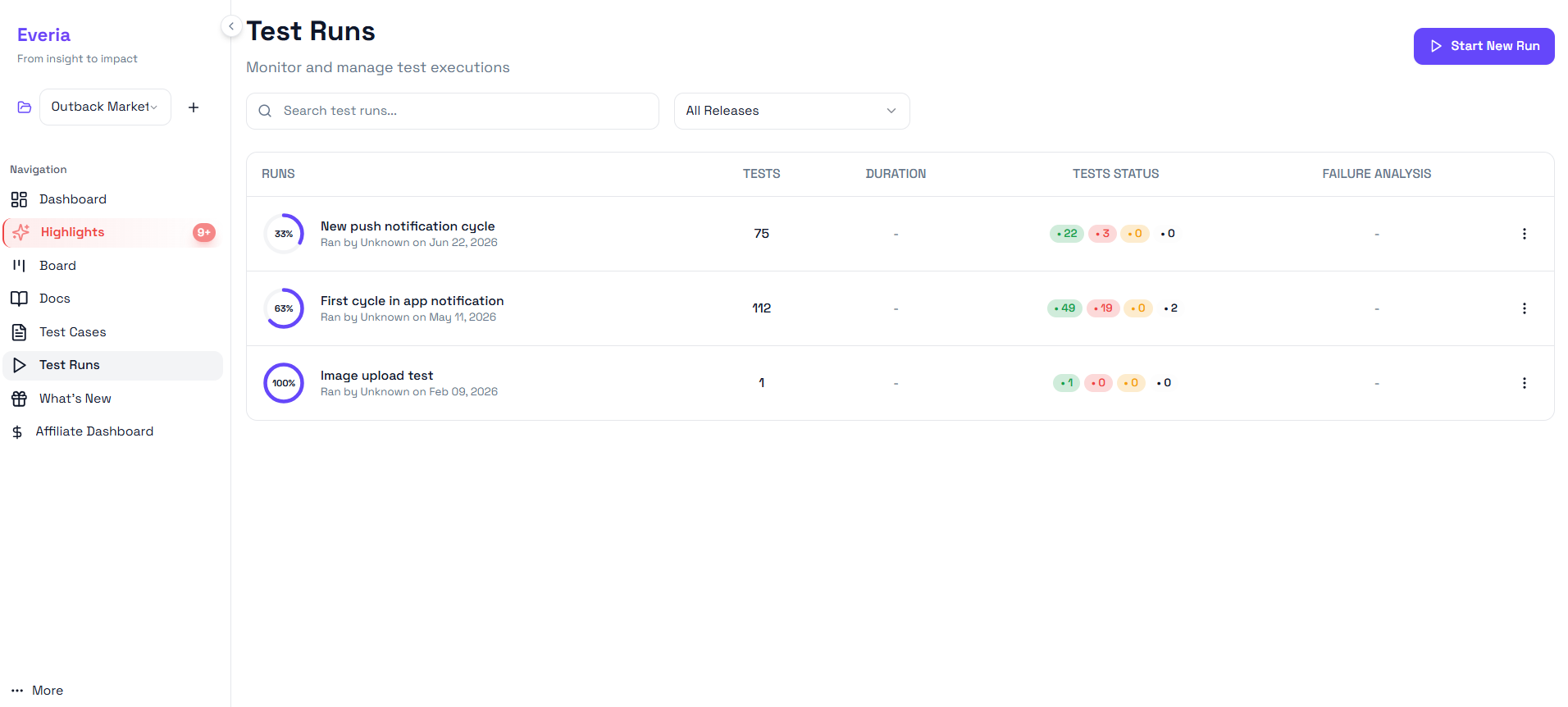
Having 272 well-organised test cases is only useful if you can run them systematically, track the results, and act on what you find. Everia's Test Runs view handles all three without requiring a separate QA execution tool.
Each test run in Everia shows the run name, the date it was executed, the total number of tests in the run, the full test status breakdown, and a failure analysis column, all in a single list view that makes comparing runs across releases straightforward.
On a real project running in Everia, the test run history shows exactly this:
New push notification cycle — Ran June 22, 2026. 75 tests. Status: 22 passed, 3 failed, 0 blocked, 0 skipped. Currently at 33% completion. Failure analysis pending.
First cycle in app notification — Ran May 11, 2026. 112 tests. Status: 49 passed, 19 failed, 0 blocked, 2 skipped. At 63% completion. 19 failures is a significant signal in a Jira + TestRail setup, those failures would need to be manually cross-referenced with Jira tickets to understand their sprint impact. In Everia, the link between test failure and the ticket it covers is already there.
Image upload test — Ran February 9, 2026. 1 test. 100% passed. A quick regression run for a small change, executed and recorded in the same system as everything else.
The "Start New Run" button at the top right lets QA leads kick off a new execution cycle in seconds, selecting which test cases to include and which release to associate the run with. The "All Releases" filter lets teams view runs across every release or narrow down to a specific one, useful when a regression appears in production and you need to trace which test run covered (or failed to cover) the affected functionality.
For teams currently running Jira alongside TestRail, the elimination of the cross-tool workflow- creating a Jira ticket, linking it to a TestRail case, running the test, and updating both systems with the result alone typically saves 3 to 5 hours per sprint in coordination overhead. That is before accounting for the requirement traceability that Everia adds on top.
Releases — Know Before You Ship, Not After
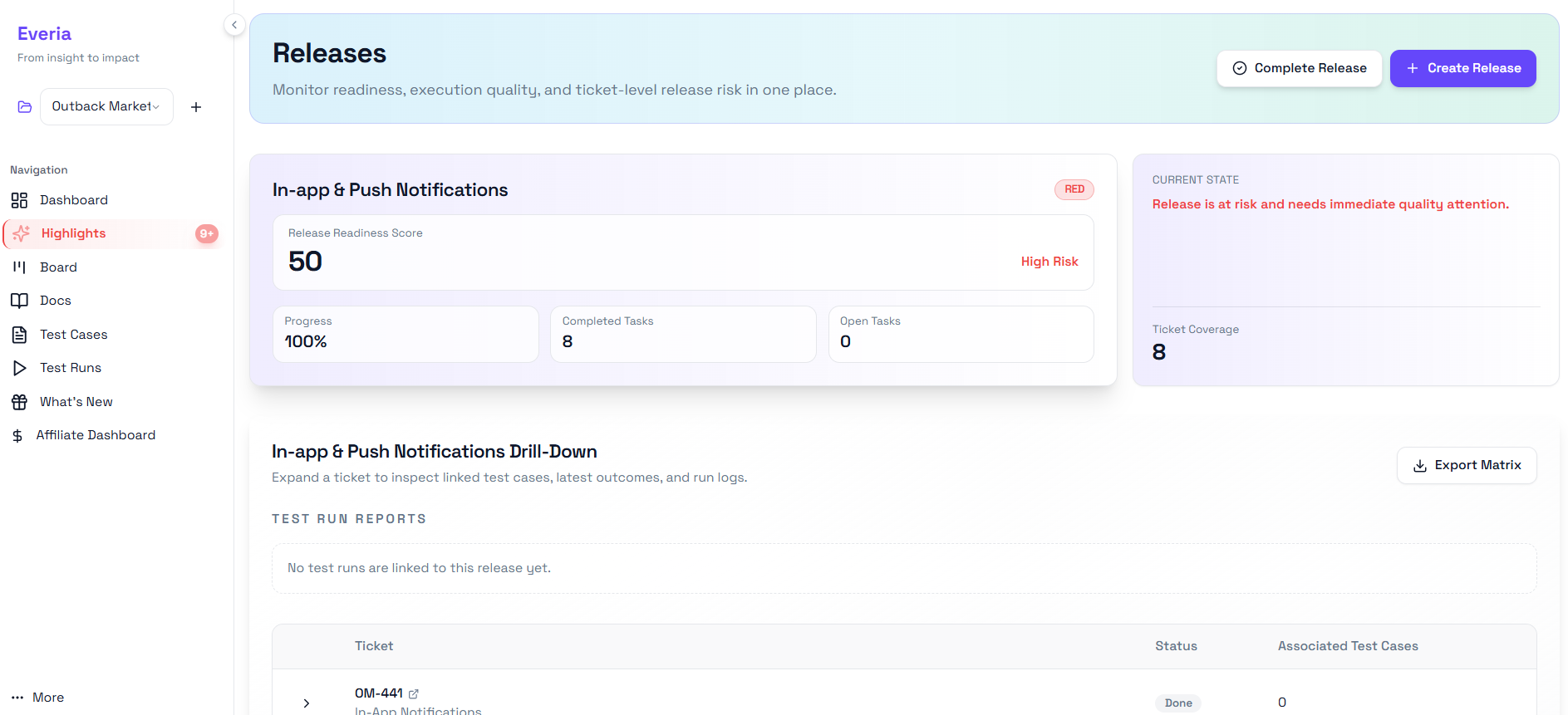
The Releases view is the feature that prevents the incident. The one where everything looked done, the ticket was closed, QA had signed off, and the feature reached production broken because the test cases were written against a requirement that had changed two weeks earlier and nobody had caught it.
Everia's Releases view gives every release a Release Readiness Score before the deployment happens. Not a gut feeling. Not a checklist someone fills out manually. A calculated score based on real data, ticket completion, test case coverage, test run outcomes, and open task count, that tells you objectively whether a release is ready to ship.
A release scoring 50 out of 100 is flagged as High Risk with a red status indicator and an explicit message: "Release is at risk and needs immediate quality attention." That is not a soft warning. It is a hard stop that gives the team the information to make a deliberate decision, ship anyway and accept the risk, or hold and fix what the score is telling you to fix.
The readiness score for In-app and Push Notifications shows exactly this picture: 100% progress (all 8 tickets completed), 0 open tasks, but a readiness score of 50 and a High Risk flag. The reason is visible in the drill-down: no test runs are linked to this release yet. Ticket coverage is 8. Test case coverage is unknown because nobody has run the tests against this release. The tickets are done. The feature is not ready.
That is the gap between "closed" and "ready" that most project tools cannot see. Everia surfaces it before the release, not after.
The drill-down view expands each ticket to show its linked test cases, the latest test run outcome for each case, and the full run log, so when a release is flagged as high risk, the team can immediately identify exactly which tickets lack coverage, which tests have failed, and what needs to happen before the readiness score moves to green.
The Export Matrix button generates a clean release coverage matrix, useful for stakeholder reporting, compliance documentation, or simply keeping a record of what was tested before each release went out.
Integrations — Slack, Telegram, and WhatsApp. All Native. All One Click.
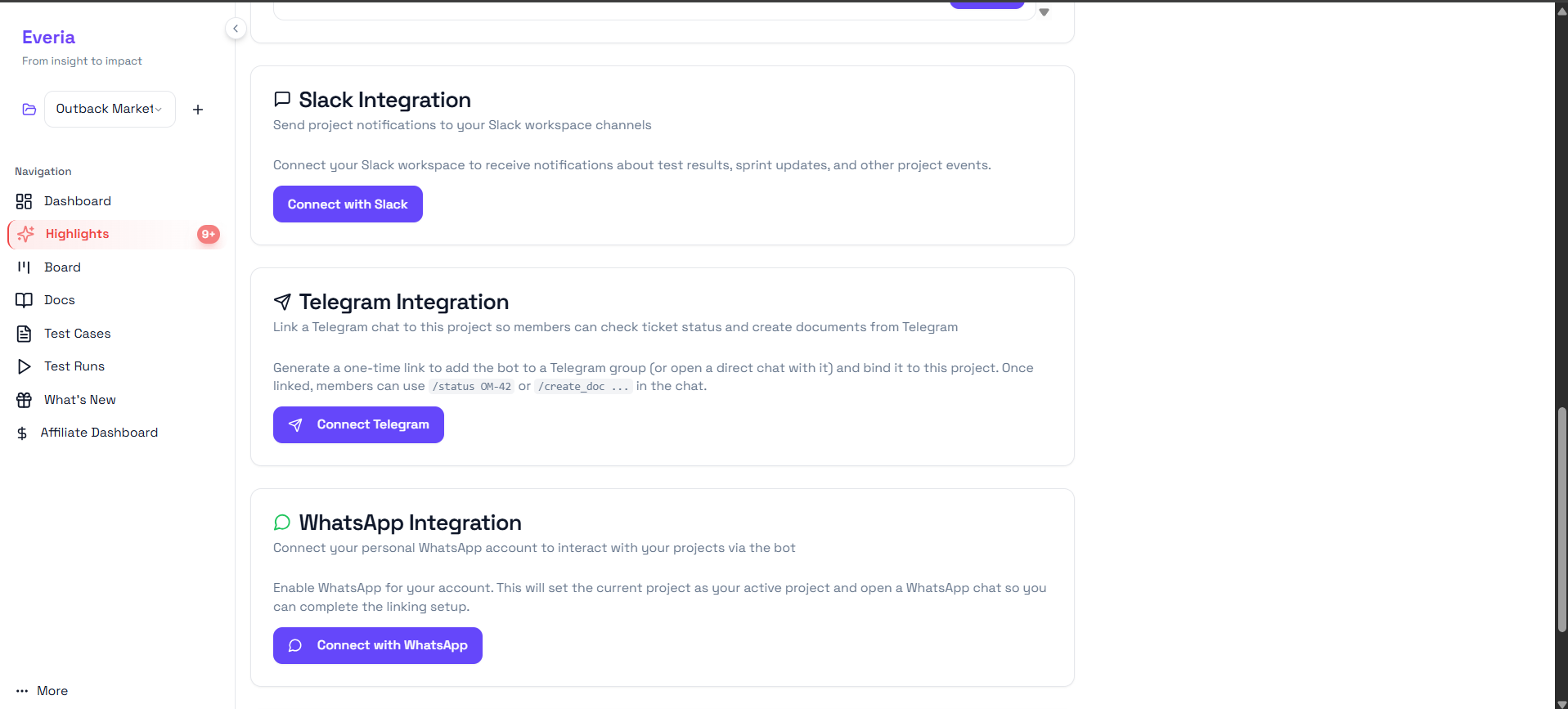
Integration sprawl is one of the less-discussed costs of the Jira ecosystem. Every connection between tools- Jira to Slack, Jira to GitHub, Jira to a communication platform requires a plugin, a configuration window, ongoing maintenance, and frequently an additional per-seat cost.
Everia's integrations are different in two ways. They are built in: no plugins, no marketplace, no additional cost. And they are bidirectional; you can interact with your project from within the communication tool, not just receive notifications from it.
Slack integration connects your Everia workspace to your Slack channels. Sprint updates, test results, and project events surface in Slack automatically so the team stays informed without having to check Everia manually between tasks.
Telegram integration goes further. Link a Telegram group to your Everia project and team members can interact with tickets directly from the chat. /status OM-42 returns the current status of ticket OM-42 without opening a browser. /create_doc creates a new document in KnowHub from the Telegram interface.
For engineering teams in European markets where Telegram is the primary team communication tool, which is a significant portion of teams in Eastern Europe, Germany, and the Netherlands, this removes the need to context-switch to Everia for quick status checks entirely.
WhatsApp integration connects your personal WhatsApp account to your active Everia project via a bot. Check ticket status, receive project updates, and stay connected to your project from the messaging app most people already have open on their phone. For team leads who need to stay informed while away from their desks, on client calls, traveling, or simply away from their laptop, this is a meaningful convenience that no Jira plugin currently offers natively.
For European teams specifically, the Telegram and WhatsApp integrations are a significant differentiator. Jira's native communication integrations cover Slack and Microsoft Teams. Getting Telegram or WhatsApp connectivity requires third-party automation tools, adding cost, adding a data processing agreement to your GDPR compliance checklist, and adding a failure point to your notification infrastructure. In Everia, all three are one click to connect from the integrations screen, with no additional cost and no additional vendor.
What's New — A Living Changelog That Keeps Everyone Aligned
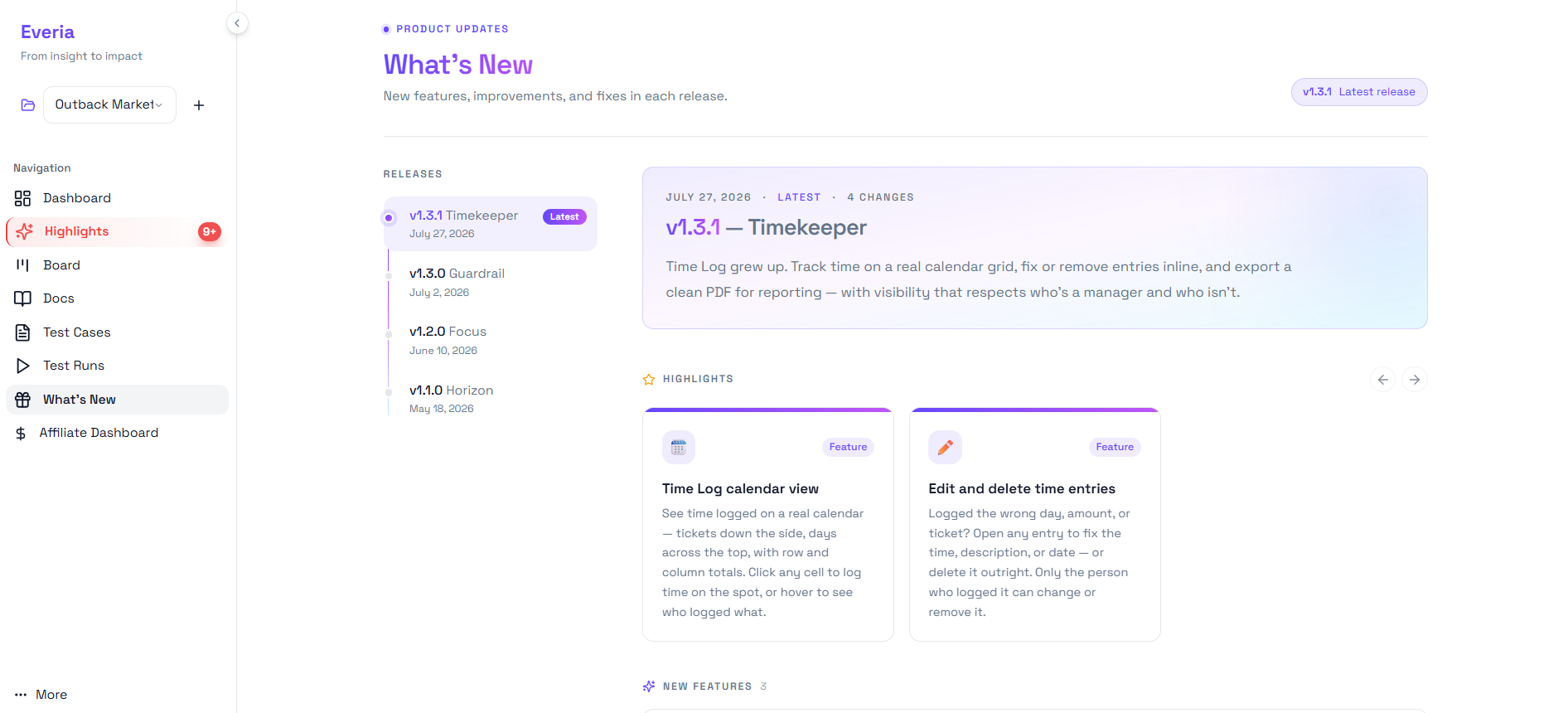
Most SaaS tools communicate product updates through email newsletters that go unread and changelog pages that nobody checks. Everia surfaces updates inside the product itself, in a dedicated What's New section that every team member can access from the navigation, versioned and dated, with clear descriptions of what changed and what it means for their workflow.
The most recent release, v1.3.1, named Timekeeper, shipped July 27, 2026, included four changes focused on time logging:
Time Log calendar view — Time logged is now visible on a real calendar grid, with tickets down the side and days across the top, row and column totals calculated automatically. Click any cell to log time on the spot. Hover to see who logged what on a given day. For team leads reviewing time allocation across a sprint, this replaces the process of exporting from Tempo and building a pivot table manually.
Edit and delete time entries — Logged the wrong amount, the wrong day, or the wrong ticket? Any entry can be opened and corrected or deleted outright, with the rule that only the person who logged it can change or remove it, preserving the integrity of the time record while removing the rigidity that made time tracking feel punitive.
Previous releases, v1.3.0 Guardrail (July 2), v1.2.0 Focus (June 10), v1.1.0 Horizon (May 18), show a consistent shipping cadence: four named releases in two and a half months. The naming convention gives each release a personality that makes the changelog readable rather than a list of ticket numbers.
For agencies billing clients by time, the calendar view and PDF export capability introduced in v1.3.1 directly address one of the most common workflows that previously required Tempo, generating a clean, accurate, client-ready time report from within the project workspace without exporting to a spreadsheet first.
Affiliate Programme — Earn by Referring Teams You Actually Believe In
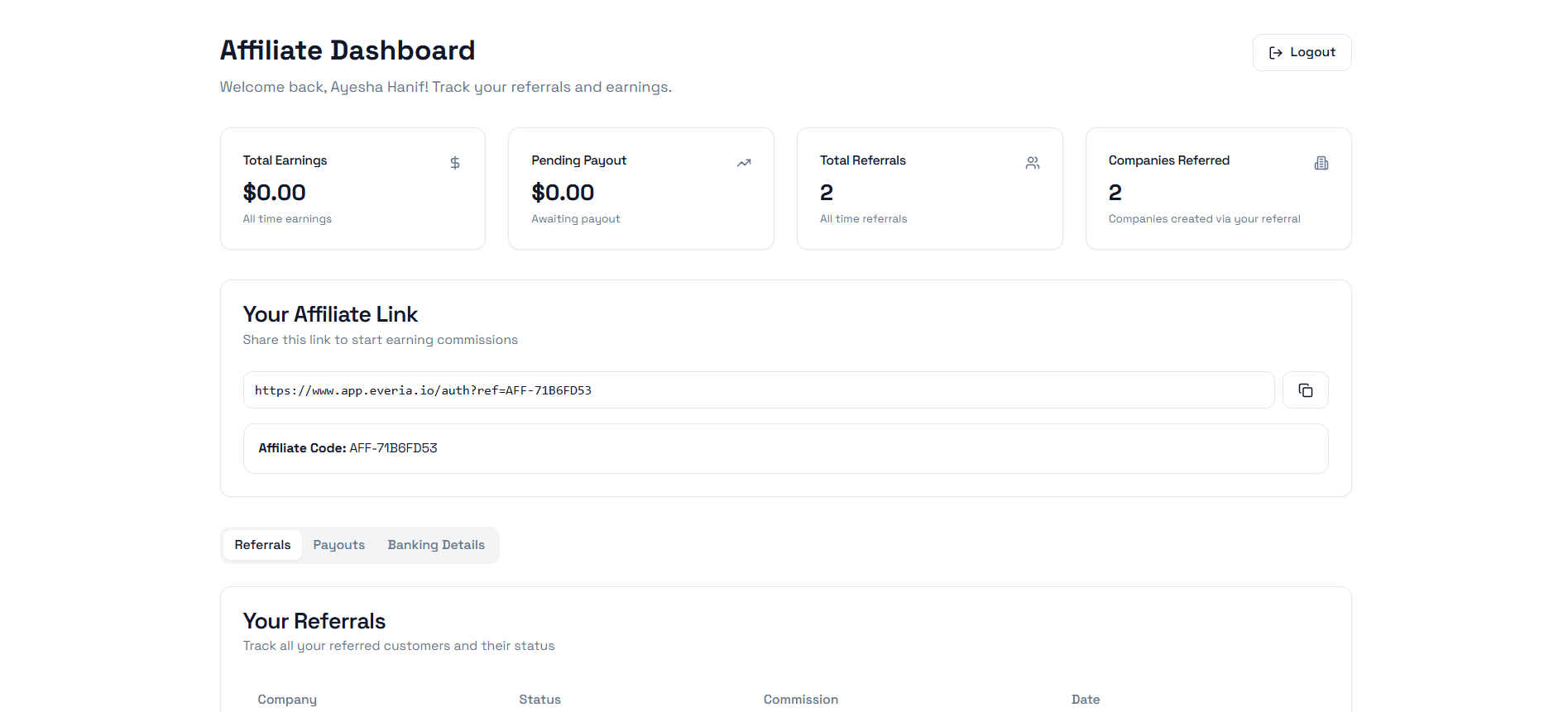
Everia's affiliate programme is built directly into the product, accessible from the main navigation under Affiliate Dashboard. It is not a separate sign-up flow on a marketing page. It is part of the product experience, because Everia expects the people who use it to be the ones who recommend it.
The dashboard shows everything in one place: total earnings, pending payouts awaiting processing, total referrals all time, and the number of companies created via your referral link. Your unique affiliate link and affiliate code are displayed prominently and can be copied in one click.
The referrals tab tracks every company you have referred, their status, the commission associated with each, and the date they signed up. The payouts tab shows your payment history and pending amounts. The banking details tab is where you set up your payout destination.
For consultants, freelancers, and agency leads who regularly advise teams on tooling, this is a straightforward way to generate revenue from recommendations that are already part of how you work. The programme requires no separate application, no minimum follower count, and no approval process beyond having an Everia account. The affiliate link is available from day one, and the dashboard updates in real time as referrals come in.
Migrating From Jira: What to Expect
The number one concern teams have when considering a switch is not cost or features, but the migration. What happens to our existing tickets? How long will it take? What breaks?
Here is the honest answer: Everia is designed to get teams up and running in one afternoon. Onboarding is designed for teams that don't have weeks to dedicate to a migration project. You do not need to move everything on day one. Most teams start by running a single sprint on Everia in parallel, get comfortable with the workflow, and then make the full switch once they have seen it work in practice.
There is a free plan with no expiry and no credit card required. That is the lowest-risk way to start, run a real project, not a demo, and judge it on real output.
The Bottom Line
Jira is not going anywhere. It will continue to serve large enterprises with dedicated tool admins and procurement budgets that make per-seat pricing a rounding error.
But for the growing majority of European teams, startups, agencies, and mid-sized engineering organizations, the calculus is shifting. The cost of stitching five tools together is no longer just financial. It is cognitive load, lost context, compliance overhead, and hours spent on coordination that should have been spent on shipping.
Everia is the best because there is a better way: one workspace and an AI that keeps everything connected so your team can focus on the actual work. If you are renewing your Jira subscription in the next 90 days, run one sprint on Everia first.
Everia.io; free to start, no card needed.
Frequently Asked Questions
Is Everia actually a Jira replacement or just a project management tool?
It is a full replacement for the entire Atlassian stack most teams are running, Jira for tickets and sprints, Confluence for documentation (via KnowHub), TestRail or Zephyr for QA, and Tempo for time tracking. You are not trading one tool for another; you are consolidating four into one.
How does Everia's pricing compare to Jira for a growing team?
Jira charges full enterprise fees per user per month across your entire organization, meaning your costs balloon even for stakeholders who only log in to view updates. Everia charges €12/member/month for active builders and gives 100% FREE access to all viewers and stakeholders with no annual lock-ins. A 15-person team replacing Jira + Confluence + Zephyr + Tempo typically saves thousands annually by eliminating the seat tax on non-developer roles.
Is Everia GDPR compliant?
Yes. Everia is built GDPR compliant. For European teams, particularly those in regulated industries or handling client data, this means one platform, one data processing agreement, and a single audit trail instead of managing compliance across multiple vendors simultaneously.
How long does it take to migrate from Jira to Everia?
Most teams are up and running within an afternoon. Everia is designed for teams that do not have weeks to spend on a migration project. The recommended approach is to run one real sprint on Everia alongside your existing setup, see how it performs in practice, and then make the full switch from a position of confidence rather than assumption.
Do we need to move all our existing data over immediately?
No. You can start fresh with a new project on Everia’s Free plan (up to 3 members, no credit card required) and migrate historical data at your own pace using our Jira or ClickUp import tools. Many teams find they rarely need data older than a few sprints anyway, making the transition far lighter than it initially seems.
What happens when our team scales beyond the Team plan limits?
Everia’s Enterprise plan is designed for scaling organizations requiring signed DPAs, SCIM, extended audit retention, and dedicated or on-premises hosting. Unlike legacy platforms that penalize growing teams with seat taxes, Everia keeps viewer access 100% free and charges a simple €12/member/month on the Team plan, ensuring costs only scale with active builders.
Is the AI actually useful or just a marketing feature?
The AI in Everia is embedded at the architecture level with deep workspace memory, not bolted on as a generic chat interface. It reads your complete project history to draft sprint updates from live data, flag capacity overloads 48 hours before a sprint starts, calculate real-time Release Readiness Scores, and turn requirement changes directly into linked tickets and test cases. Teams using it consistently save over 1.8 hours per developer daily in manual coordination.
We are a non-European team. Can we still use Everia?
Absolutely. While Everia is particularly well-suited for European teams given its GDPR compliance and flat pricing that works well in smaller markets, it is built for any team that is tired of paying for and maintaining four separate tools. The free plan is open to everyone globally.
What integrations does Everia support?
The Team plan includes Slack, Telegram bot integration for ticket management directly from chat, and full GitHub/GitLab integration, including automated PR ticket creation. The Growth plan adds API access for custom integrations.
Is there a free trial before committing to a paid plan?
Yes, Everia offers a genuinely Free plan with no credit card required, no expiration date, and no hidden trial lockouts. It includes access to all core modules for up to 3 members, 1 project, 10 free stakeholder viewers, and 500 AI credits per month—giving your team everything needed to run a real sprint and evaluate Everia on live output before upgrading.